

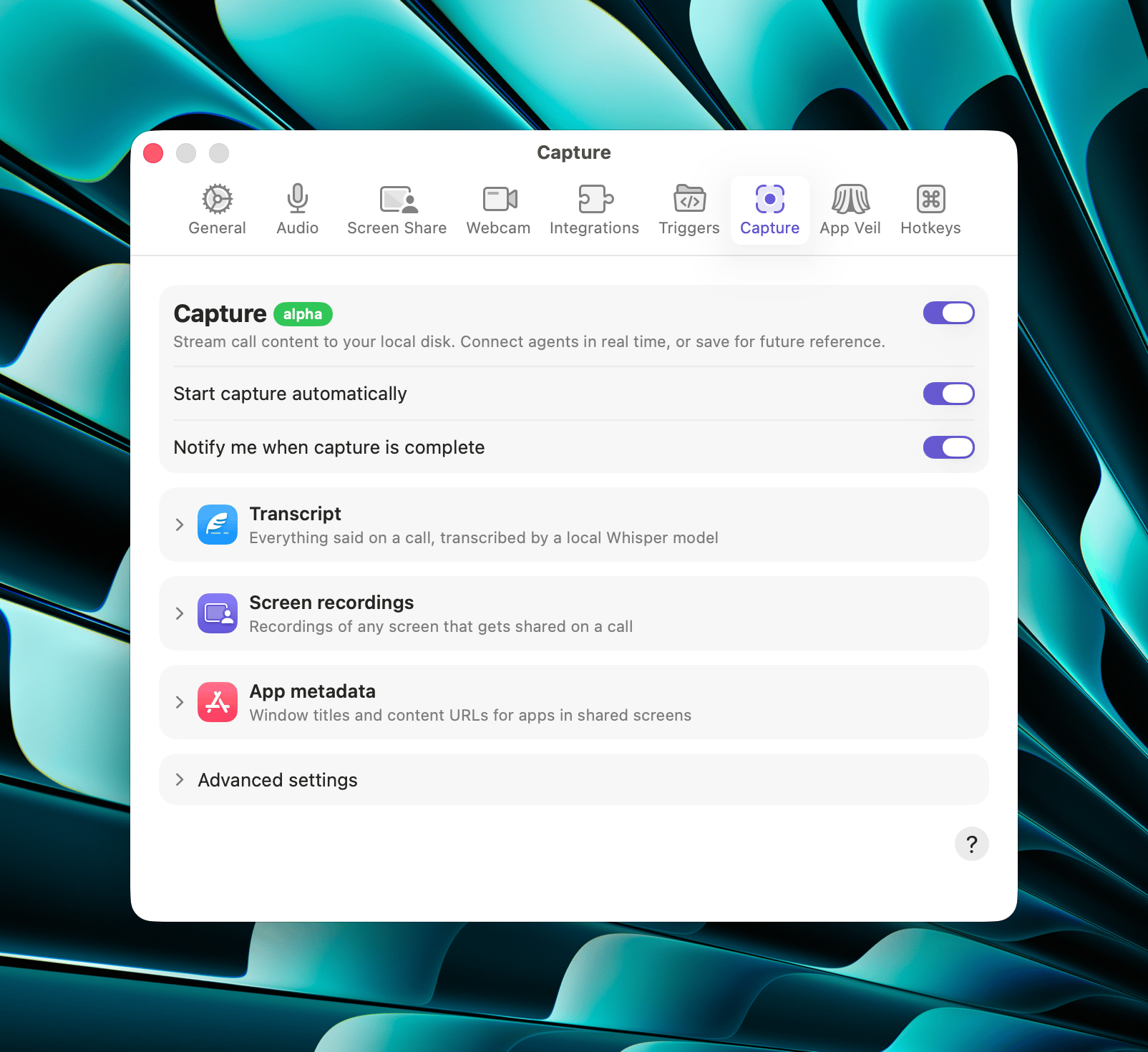
Capture is a single switch: there are no separate controls for the transcript, the screen recordings, and the app metadata. Turning Capture off is how you stop recording all three. To keep your own window titles and URLs from reaching other people’s captures, turn off Share app metadata or veil the app with App Veil.
Start automatically
When this is on, Tuple starts capturing as soon as you join a call, just as if you’d clicked the Capture call control yourself. Other participants see a Capturing indicator next to your name in the participant list. This is off by default. The Start Capture? notification Tuple shows on your first call after setup contains an Automatically start on future calls checkbox; accepting it with the box checked turns this setting on.Transcript
The Transcript section holds the on-device model Capture uses to turn speech into text. Click Choose… next to Local Whisper Model to open the model picker.Supported models
Tuple ships with a list of pre-optimized transcription models that you can download on demand. These are GGML models designed to be used by whisper.cpp, which have been further optimized to utilize CoreML. The base models have all been sourced from the main whisper.cpp repository.
Turbo is the recommended default.
Hosted models are stored in
~/Library/Application Support/Tuple/Transcription Models/. Switching models leaves the previously downloaded model on disk; use Remove in the picker to delete one.
If a download fails, or if a model file is corrupt or can’t be installed, a red error icon appears next to the model in the picker. Click the icon to see the specific problem and the recommended fix:
- Model is corrupted — remove the model and download it again (or, for a custom model, choose a new file).
- Download failed — the download didn’t complete; try again.
- Not enough disk space — free up space on your disk and try the download again.
Custom model
If you’d rather use your own GGML model, the Custom model row at the bottom of the picker lets you choose a.bin or .gguf model file from disk with the Choose… button. The file you pick becomes your selected model right away.
Custom models need a matching
.mlmodelc CoreML sidecar installed alongside the GGML file. Tuple’s built-in models include this sidecar automatically; a custom GGML file does not. If the CoreML bundle isn’t present next to the model, Whisper throws an error when Tuple tries to load it.Screen recordings
While Capture is running and a screen is shared (yours or someone else’s), Tuple records that screen’s video into the same local database. Video can consume a lot of disk space, so it gets its own size cap on top of session expiry:- Max cache size — a cap on total stored video. Defaults to 4 GB, with options of 1, 2, 4, 8, and 16 GB, or No Size Limit. When the cap is reached, the oldest recordings are deleted first. The row also reports how much video you’re currently storing.
App metadata
When Capture is enabled, Tuple records the app metadata that other participants send while screen sharing (the window title and content URL of whatever app they have focused.) This allows you to have a history of all of the files or URLs you looked at on a call. There currently aren’t any settings that dictate what you record from others, so this section is only here as a reminder that app metadata is a component of Capture. The corresponding outbound setting (what you send to other people while sharing your own screen) lives with the rest of the sharing settings, as Share app metadata in Screen share preferences. Titles and URLs are scrubbed of credentials by the machine that shares them, before they’re shared — sign-in URLs are dropped outright, and secrets in a terminal’s window title are replaced with•••. See Sharing app metadata for the full rules and their limits.
Advanced
Session expiry
How long a whole capture session is kept before Tuple deletes it. The transcript, screen recordings, and app metadata for a session all expire together, after the duration you choose here. Choose 24 Hours, 7 Days, 30 Days, 90 Days, 1 Year, or No Expiration. The default is No Expiration. Shortening the window asks for your confirmation because anything already older than the new window is deleted from this Mac right away.Database location
Captures are stored in a single local SQLite database at~/Library/Application Support/Tuple/index.db, not as individual files. The location can’t be changed - this row is just informational. Click the copy button to copy the path. Tuple doesn’t encrypt this database.