

Simulating events during development
While developing a trigger, it’s likely you’ll want to invoke it many times. To make this easier, we’ve given you the ability to simulate each of Tuple’s lifecycle events populated with dummy data: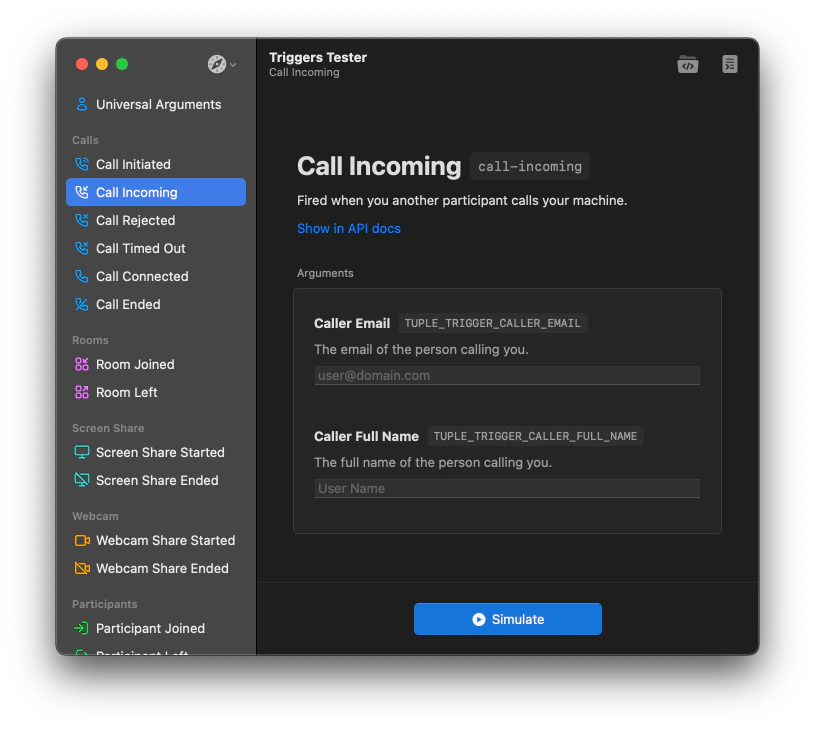
Debugging live triggers
Once your triggers run on actual Tuple calls, you might notice they’re not behaving exactly as you’d like. To diagnose the issue, take a look at~/.tuple/triggers/triggers.log. This file contains all of the output from the trigger runner, as well as any stdout/stderr from your scripts.
Here’s some sample output. In the example below, we see two scripts running. The first works correctly and exits with status code 0. The second has a typo and reports the issue via STDERR.