Tuple documentation home page
Search...
⌘K
Ask AI
Support
Download
Download
Search...
Navigation
Windows
General
Website
Download
Getting Started
Installation
Supported platforms
Agreements and Policies
Pairing with Tuple
Screen Sharing
Calls
Features
Managing Your Account
Profile and Security
Account Type and Access
Integrations and Activity
Team Management
Members and Permissions
Billing and Subscription
Authentication and SSO
Reporting
Application Preferences
macOS
Windows
General
Audio
Network
App Veil
Troubleshooting
Connectivity and Call Quality
Audio and Notifications
Performance and Stability
Updates and System Setup
Diagnostics and Support
On this page
Appearance
Show who I’m pairing with
Persistent Drawings
Launch at login
Windows
General
Copy page
Copy page
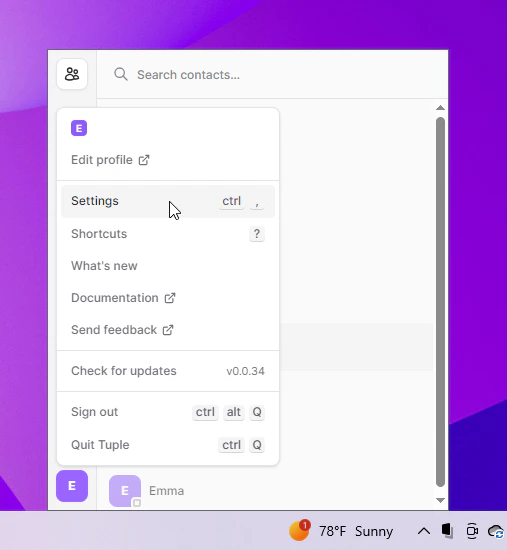
To open your preferences, click your avatar at the bottom left of the Tuple popover and select
Settings
from the dropdown:
You can also use the keyboard shortcut
ctrl+,
. This will bring up the settings window:
Appearance
Select if you want Tuple to use light or dark mode.
Show who I’m pairing with
If selected, people you and your pair both know will be able to see your call’s participants in their contact list. You can learn more
here
.
Persistent Drawings
If selected, any drawings created with the paint mouse mode will persist until you right click.
Launch at login
If selected, Tuple will launch when you log in.
Was this page helpful?
Yes
No
Integrations
Audio
⌘I
Assistant
Responses are generated using AI and may contain mistakes.