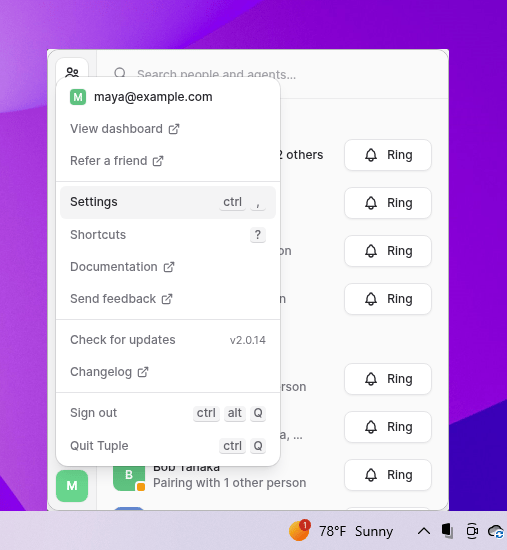
To open your preferences, click your avatar at the bottom left of the Tuple popover and select Settings from the dropdown:You can also use the keyboard shortcut ctrl+,. This will bring up the settings window. You can then select the Audio tab:
You can select audio devices that you want Tuple to use for input and output, or leave it as the System Default. If you explicitly set these devices here, then the device you select will always be used if it’s available. You can see which device is selected even if disconnected by looking at the text below each dropdown.Note: We recommend that you use the System Default values to avoid confusion. This is because most controls (e.g. keyboard shortcuts for volume/muting) will affect the system’s default devices, which might lead to confusion if you have Tuple set to override it.If you have a consistent pairing setup which is different than your usual devices, or if you want to route audio through a third-party app (e.g. Krisp.ai), then you could set these manually, but please be aware that this may cause unexpected behavior with system audio controls as they only control the default devices.
Tuple for Windows utilizes a custom subsystem for audio input and output. However, if you’re experiencing issues, you can choose to enable the older, legacy audio subsystem. This shouldn’t happen often - please contact support if you’re experiencing problems.
Was this page helpful?
{"docsConfig":{"theme":"palm","$schema":"https://mintlify.com/docs.json","name":"Tuple documentation","description":"Documentation for Tuple, the remote pair programming app for developers on macOS, Windows, and Linux.","colors":{"primary":"#6a5ed9","light":"#adb6f4","dark":"#5e50c7"},"logo":{"light":"https://mintcdn.com/tuple-0f82e5be/-nDSac4-fwCPupIa/logo/light.png?fit=max\u0026auto=format\u0026n=-nDSac4-fwCPupIa\u0026q=85\u0026s=691cb0a8e2a3dcdc0227b893ee08b6b6","dark":"https://mintcdn.com/tuple-0f82e5be/-nDSac4-fwCPupIa/logo/dark.png?fit=max\u0026auto=format\u0026n=-nDSac4-fwCPupIa\u0026q=85\u0026s=5a19781377926b4667bf0867efd75e57"},"favicon":"https://mintcdn.com/tuple-0f82e5be/EHjq0cG1Dd6CF26O/favicon.svg?fit=max\u0026auto=format\u0026n=EHjq0cG1Dd6CF26O\u0026q=85\u0026s=1b6c6ae1f64a9c50fe32a72a08c1e044","navbar":{"links":[{"href":"https://tuple.app?utm_source=docs","label":"Website"},{"href":"mailto:support@tuple.app","label":"Support"}],"primary":{"type":"button","label":"Download","href":"https://tuple.app/download?utm_source=docs"}},"footer":{"socials":{"x":"https://x.com/tuple","linkedin":"https://linkedin.com/company/tuple","youtube":"https://www.youtube.com/@tuple-app"},"links":[{"header":"Product","items":[{"label":"Download","href":"https://tuple.app/download?utm_source=docs"},{"label":"Changelog","href":"/changelog"},{"label":"Pricing","href":"https://tuple.app/pricing?utm_source=docs"}]},{"header":"Resources","items":[{"label":"Support","href":"mailto:support@tuple.app"},{"label":"Blog","href":"https://tuple.app/blog?utm_source=docs"}]}]},"seo":{"metatags":{"og:image":"https://docs.tuple.app/images/og.jpg"}},"integrations":{"posthog":{"apiKey":"phc_1X4UcburMnpeGzdvbEpquCPIp4RO5Wn46yogbxpD1Y8","apiHost":"https://us.i.posthog.com"}},"contextual":{"options":["copy","view","chatgpt","claude","perplexity","mcp","cursor","vscode"],"display":"header"},"styling":{"latex":false},"navigation":{"global":{"anchors":[{"anchor":"Changelog","icon":"list","href":"/changelog"}]},"pages":[]}},"deployment":{"deploymentMetadataValue":{"subdomain":"tuple-0f82e5be","hasAudioNarration":false,"actualSubdomain":"tuple-0f82e5be","customDomains":["docs.tuple.app"],"gitSource":{"type":"github","owner":"tupleapp","repo":"docs","deployBranch":"main","contentDirectory":"","isPrivate":true,"mountPath":"","label":""},"feedback":{"thumbs":true,"agentFeedback":false},"entitlements":{"AI_CHAT":{"status":"ENABLED"},"WEB_MCP":{"status":"ENABLED"},"NARRATION":{"status":"ENABLED"}},"buildId":"6af636f6e2831ad30e64773f","clientVersion":"0.0.4117","searchFilterCounts":[{"language":"default","tag":"Pairing with Tuple","count":26},{"language":"default","tag":"Team Management","count":19},{"language":"default","tag":"Features","count":15},{"language":"default","tag":"Troubleshooting","count":14},{"language":"default","tag":"Application Preferences","count":13},{"language":"default","tag":"macOS","count":9},{"language":"default","tag":"Authentication and SSO","count":9},{"language":"default","tag":"Tuple CLI","count":7},{"language":"default","tag":"Calls","count":7},{"language":"default","tag":"Managing Your Account","count":6}]},"assistantConfig":{"enableAskAiButton":false,"enableStarterQuestions":true,"enableContextualStarterQuestions":true,"enableAskAiSearchBar":true,"deflection":{"enabled":true,"email":"support@tuple.app","showHelpButton":true}},"basePath":"","hasChatPermissions":true,"hasWebMcpPermissions":true,"toggles":[{"name":"kill-isr","enabled":true,"variant":{"name":"disabled","enabled":false,"feature_enabled":true},"impressionData":false},{"name":"custom-rbac-roles","enabled":true,"variant":{"name":"disabled","enabled":false,"feature_enabled":true},"impressionData":false},{"name":"agent-mintlify-slack","enabled":true,"variant":{"name":"disabled","enabled":false,"feature_enabled":true},"impressionData":false},{"name":"agent-integrations-settings","enabled":true,"variant":{"name":"disabled","enabled":false,"feature_enabled":true},"impressionData":false},{"name":"rbac-expansion","enabled":true,"variant":{"name":"disabled","enabled":false,"feature_enabled":true},"impressionData":false},{"name":"automations-pr-grouping","enabled":true,"variant":{"name":"disabled","enabled":false,"feature_enabled":true},"impressionData":false},{"name":"custom-prefix","enabled":true,"variant":{"name":"disabled","enabled":false,"feature_enabled":true},"impressionData":false},{"name":"analytics-v7","enabled":true,"variant":{"name":"disabled","enabled":false,"feature_enabled":true},"impressionData":false},{"name":"user-flows-analytics","enabled":true,"variant":{"name":"disabled","enabled":false,"feature_enabled":true},"impressionData":false},{"name":"no-publish-flow","enabled":true,"variant":{"name":"disabled","enabled":false,"feature_enabled":true},"impressionData":false},{"name":"workos-onboarding","enabled":true,"variant":{"name":"disabled","enabled":false,"feature_enabled":true},"impressionData":false},{"name":"snapshot-serving-live","enabled":true,"variant":{"name":"disabled","enabled":false,"feature_enabled":true},"impressionData":false},{"name":"stripTemperatureMiddleware","enabled":true,"variant":{"name":"disabled","enabled":false,"feature_enabled":true},"impressionData":false},{"name":"support-platform-pylon-zendesk","enabled":true,"variant":{"name":"disabled","enabled":false,"feature_enabled":true},"impressionData":false},{"name":"snapshot-serving","enabled":true,"variant":{"name":"disabled","enabled":false,"feature_enabled":true},"impressionData":false},{"name":"instant-rollback","enabled":true,"variant":{"name":"disabled","enabled":false,"feature_enabled":true},"impressionData":false},{"name":"granular-notifications-server","enabled":true,"variant":{"name":"disabled","enabled":false,"feature_enabled":true},"impressionData":false},{"name":"granular-notifications","enabled":true,"variant":{"name":"disabled","enabled":false,"feature_enabled":true},"impressionData":false},{"name":"automations-fable","enabled":true,"variant":{"name":"disabled","enabled":false,"feature_enabled":true},"impressionData":false},{"name":"fixed-ai-action-pricing","enabled":true,"variant":{"name":"disabled","enabled":false,"feature_enabled":true},"impressionData":false},{"name":"automation-resolve-merge-conflict","enabled":true,"variant":{"name":"disabled","enabled":false,"feature_enabled":true},"impressionData":false},{"name":"scoped-publishing","enabled":true,"variant":{"name":"disabled","enabled":false,"feature_enabled":true},"impressionData":false},{"name":"mintql","enabled":true,"variant":{"name":"disabled","enabled":false,"feature_enabled":true},"impressionData":false},{"name":"page-level-analytics","enabled":true,"variant":{"name":"disabled","enabled":false,"feature_enabled":true},"impressionData":false},{"name":"editor-version-history-v2","enabled":true,"variant":{"name":"disabled","enabled":false,"feature_enabled":true},"impressionData":false},{"name":"billing-page-v2","enabled":true,"variant":{"name":"disabled","enabled":false,"feature_enabled":true},"impressionData":false},{"name":"full-page-search","enabled":true,"variant":{"name":"disabled","enabled":false,"feature_enabled":true},"impressionData":false},{"name":"workspace-projects","enabled":true,"variant":{"name":"disabled","enabled":false,"feature_enabled":true},"impressionData":false},{"name":"assistant-v5","enabled":true,"variant":{"name":"disabled","enabled":false,"feature_enabled":true},"impressionData":false},{"name":"fork-pr-previews","enabled":true,"variant":{"name":"disabled","enabled":false,"feature_enabled":true},"impressionData":false},{"name":"revalidation-jwt","enabled":true,"variant":{"name":"disabled","enabled":false,"feature_enabled":true},"impressionData":false},{"name":"workos-sso-scim","enabled":true,"variant":{"name":"disabled","enabled":false,"feature_enabled":true},"impressionData":false},{"name":"hobby-abuse-scan","enabled":true,"variant":{"name":"disabled","enabled":false,"feature_enabled":true},"impressionData":false},{"name":"dashboard-inbox","enabled":true,"variant":{"name":"disabled","enabled":false,"feature_enabled":true},"impressionData":false},{"name":"workos-signup","enabled":true,"variant":{"name":"disabled","enabled":false,"feature_enabled":true},"impressionData":false},{"name":"turbopuffer-dual-write","enabled":true,"variant":{"name":"disabled","enabled":false,"feature_enabled":true},"impressionData":false},{"name":"workos-enabled","enabled":true,"variant":{"name":"disabled","enabled":false,"feature_enabled":true},"impressionData":false},{"name":"approve-review-flow","enabled":true,"variant":{"name":"disabled","enabled":false,"feature_enabled":true},"impressionData":false},{"name":"editor-metadata","enabled":true,"variant":{"name":"disabled","enabled":false,"feature_enabled":true},"impressionData":false},{"name":"sso-setup-deadline-banner","enabled":true,"variant":{"name":"disabled","enabled":false,"feature_enabled":true},"impressionData":false},{"name":"turbopuffer-serve","enabled":true,"variant":{"name":"disabled","enabled":false,"feature_enabled":true},"impressionData":false},{"name":"live-agents","enabled":true,"variant":{"name":"disabled","enabled":false,"feature_enabled":true},"impressionData":false},{"name":"llms-txt-v2","enabled":true,"variant":{"name":"disabled","enabled":false,"feature_enabled":true},"impressionData":false}],"googleFontsInlined":false},"customCss":[],"page":{"pagePath":"application-preferences/windows-preferences-audio","slug":"/application-preferences/windows-preferences-audio","pageMetadata":{"title":"Audio","description":null,"href":"/application-preferences/windows-preferences-audio"},"pageType":"default","mdx":{"mdxSource":{"compiledSource":"\"use strict\";const{Fragment:_Fragment,jsx:_jsx,jsxs:_jsxs}=arguments[0];const{useMDXComponents:_provideComponents}=arguments[0];function _createMdxContent(props){const _components={a:`a`,p:`p`,strong:`strong`,..._provideComponents(),...props.components},{Heading,OptimizedImage}=_components;if(!Heading)_missingMdxReference(`Heading`,true);if(!OptimizedImage)_missingMdxReference(`OptimizedImage`,true);return _jsxs(_Fragment,{children:[_jsxs(_components.p,{children:[`To open your preferences, click your avatar at the bottom left of the Tuple popover and select `,_jsx(_components.strong,{children:`Settings`}),` from the dropdown:`]}),`\n`,_jsx(OptimizedImage,{src:`https://mintcdn.com/tuple-0f82e5be/UF5N5W8t3gU8dGua/images/application-preferences/shared/windows/open-settings-menu.png?fit=max\u0026auto=format\u0026n=UF5N5W8t3gU8dGua\u0026q=85\u0026s=3a62b50db638290a0e4fef743314171e`,alt:`Tuple avatar menu with Settings selected on Windows`,\"data-og-width\":`507`,width:`507`,\"data-og-height\":`550`,height:`550`,\"data-path\":`images/application-preferences/shared/windows/open-settings-menu.png`,\"data-optimize\":`true`,\"data-opv\":`3`,srcset:`https://mintcdn.com/tuple-0f82e5be/UF5N5W8t3gU8dGua/images/application-preferences/shared/windows/open-settings-menu.png?w=280\u0026fit=max\u0026auto=format\u0026n=UF5N5W8t3gU8dGua\u0026q=85\u0026s=609929bf5e733ac69af0360a2304ae9c 280w, https://mintcdn.com/tuple-0f82e5be/UF5N5W8t3gU8dGua/images/application-preferences/shared/windows/open-settings-menu.png?w=560\u0026fit=max\u0026auto=format\u0026n=UF5N5W8t3gU8dGua\u0026q=85\u0026s=a5ec1383a19045bd04fb097676c3080f 560w, https://mintcdn.com/tuple-0f82e5be/UF5N5W8t3gU8dGua/images/application-preferences/shared/windows/open-settings-menu.png?w=840\u0026fit=max\u0026auto=format\u0026n=UF5N5W8t3gU8dGua\u0026q=85\u0026s=553607ef2e03e7ef468f49cd781cbdf7 840w, https://mintcdn.com/tuple-0f82e5be/UF5N5W8t3gU8dGua/images/application-preferences/shared/windows/open-settings-menu.png?w=1100\u0026fit=max\u0026auto=format\u0026n=UF5N5W8t3gU8dGua\u0026q=85\u0026s=f7e616f8ac3576d3aae0748376e226a7 1100w, https://mintcdn.com/tuple-0f82e5be/UF5N5W8t3gU8dGua/images/application-preferences/shared/windows/open-settings-menu.png?w=1650\u0026fit=max\u0026auto=format\u0026n=UF5N5W8t3gU8dGua\u0026q=85\u0026s=fe2027df51dd2043192ccf0f4c4339ce 1650w, https://mintcdn.com/tuple-0f82e5be/UF5N5W8t3gU8dGua/images/application-preferences/shared/windows/open-settings-menu.png?w=2500\u0026fit=max\u0026auto=format\u0026n=UF5N5W8t3gU8dGua\u0026q=85\u0026s=2983f8db18cd78393235802080684685 2500w`}),`\n`,_jsxs(_components.p,{children:[`You can also use the keyboard shortcut `,_jsx(_components.strong,{children:`ctrl+,`}),`. This will bring up the settings window. You can then select the `,_jsx(_components.strong,{children:`Audio`}),` tab:`]}),`\n`,_jsx(OptimizedImage,{src:`https://mintcdn.com/tuple-0f82e5be/O4IiteXcXoa48ycm/images/application-preferences/windows-preferences-audio/audio-tab.png?fit=max\u0026auto=format\u0026n=O4IiteXcXoa48ycm\u0026q=85\u0026s=c130eda1a5dd44195c64e37a292fa676`,alt:`Settings window with the Audio tab selected on Windows`,\"data-og-width\":`617`,width:`617`,\"data-og-height\":`628`,height:`628`,\"data-path\":`images/application-preferences/windows-preferences-audio/audio-tab.png`,\"data-optimize\":`true`,\"data-opv\":`3`,srcset:`https://mintcdn.com/tuple-0f82e5be/O4IiteXcXoa48ycm/images/application-preferences/windows-preferences-audio/audio-tab.png?w=280\u0026fit=max\u0026auto=format\u0026n=O4IiteXcXoa48ycm\u0026q=85\u0026s=d52336c11bf8124bd571ccf7ec766c91 280w, https://mintcdn.com/tuple-0f82e5be/O4IiteXcXoa48ycm/images/application-preferences/windows-preferences-audio/audio-tab.png?w=560\u0026fit=max\u0026auto=format\u0026n=O4IiteXcXoa48ycm\u0026q=85\u0026s=011ce4d1552e0c9763a17c5efaab15df 560w, https://mintcdn.com/tuple-0f82e5be/O4IiteXcXoa48ycm/images/application-preferences/windows-preferences-audio/audio-tab.png?w=840\u0026fit=max\u0026auto=format\u0026n=O4IiteXcXoa48ycm\u0026q=85\u0026s=e8cb68af4bebe9281ef131720e31ee06 840w, https://mintcdn.com/tuple-0f82e5be/O4IiteXcXoa48ycm/images/application-preferences/windows-preferences-audio/audio-tab.png?w=1100\u0026fit=max\u0026auto=format\u0026n=O4IiteXcXoa48ycm\u0026q=85\u0026s=f7fe30d8efc7dd3f6566745a794ee4a6 1100w, https://mintcdn.com/tuple-0f82e5be/O4IiteXcXoa48ycm/images/application-preferences/windows-preferences-audio/audio-tab.png?w=1650\u0026fit=max\u0026auto=format\u0026n=O4IiteXcXoa48ycm\u0026q=85\u0026s=f0de7815dfe5c8bc3f81c64f59bc24b7 1650w, https://mintcdn.com/tuple-0f82e5be/O4IiteXcXoa48ycm/images/application-preferences/windows-preferences-audio/audio-tab.png?w=2500\u0026fit=max\u0026auto=format\u0026n=O4IiteXcXoa48ycm\u0026q=85\u0026s=58b92218ab010a5a3e7c26bfcd7be394 2500w`}),`\n`,_jsx(Heading,{level:`3`,id:`input/output-device`,children:`Input/Output Device`}),`\n`,_jsx(_components.p,{children:`You can select audio devices that you want Tuple to use for input and output, or leave it as the System Default. If you explicitly set these devices here, then the device you select will always be used if it’s available. You can see which device is selected even if disconnected by looking at the text below each dropdown.`}),`\n`,_jsxs(_components.p,{children:[_jsx(_components.strong,{children:`Note:`}),` We recommend that you use the System Default values to avoid confusion. This is because most controls (e.g. keyboard shortcuts for volume/muting) will affect the system’s default devices, which might lead to confusion if you have Tuple set to override it.`]}),`\n`,_jsxs(_components.p,{children:[`If you have a consistent pairing setup which is different than your usual devices, or if you want to route audio through a third-party app (e.g. `,_jsx(_components.a,{href:`https://krisp.ai/`,children:`Krisp.ai`}),`), then you could set these manually, but please be aware that this may cause unexpected behavior with system audio controls as they only control the default devices.`]}),`\n`,_jsx(Heading,{level:`3`,id:`start-muted`,children:`Start muted`}),`\n`,_jsx(_components.p,{children:`If you prefer to use a different service for audio during your pairing sessions, you can enable this setting to have Tuple always start calls muted.`}),`\n`,_jsx(Heading,{level:`3`,id:`legacy-audio-engine`,children:`Legacy Audio Engine`}),`\n`,_jsxs(_components.p,{children:[`Tuple for Windows utilizes a custom subsystem for audio input and output. However, if you’re experiencing issues, you can choose to enable the older, legacy audio subsystem. This shouldn’t happen often - please contact `,_jsx(_components.a,{href:`mailto:support@tuple.app`,children:`support`}),` if you’re experiencing problems.`]})]})}function MDXContent(props={}){const{wrapper:MDXLayout}={..._provideComponents(),...props.components};return MDXLayout?_jsx(MDXLayout,{...props,children:_jsx(_createMdxContent,{...props})}):_createMdxContent(props)}return{default:MDXContent};function _missingMdxReference(id,component){throw new Error(`Expected `+(component?`component`:`object`)+\" `\"+id+\"` to be defined: you likely forgot to import, pass, or provide it.\")}","frontmatter":{},"scope":{"config":{},"pageMetadata":{"title":"Audio","description":null,"href":"/application-preferences/windows-preferences-audio"}}},"mdxSourceWithNoJs":null},"mdxExtracts":{"tableOfContents":[{"title":"Input/Output Device","slug":"input/output-device","depth":3,"children":[]},{"title":"Start muted","slug":"start-muted","depth":3,"children":[]},{"title":"Legacy Audio Engine","slug":"legacy-audio-engine","depth":3,"children":[]}],"codeExamples":{}},"jsLinks":[],"subdomain":"tuple-0f82e5be","siteName":"Tuple documentation","title":"Audio - Tuple documentation","contextualStarterQuestions":[{"_id":"6af35233e98c54a9fd38cbd3","deploymentId":"69cbe83e7f226f107dbe3406","questionText":"How do I open audio settings?","status":"active","generatedBy":"contextual","path":"application-preferences/windows-preferences-audio","createdAt":"2026-11-10T17:19:47.785Z","updatedAt":"2026-11-10T17:19:47.785Z","__v":0},{"_id":"6af35233e98c54a9fd38cbd4","deploymentId":"69cbe83e7f226f107dbe3406","questionText":"Where do I find audio preferences?","status":"active","generatedBy":"contextual","path":"application-preferences/windows-preferences-audio","createdAt":"2026-11-10T17:19:47.785Z","updatedAt":"2026-11-10T17:19:47.785Z","__v":0}],"navMaps":{"firstHrefInVersion":{},"firstHrefInLanguage":{}},"lastModified":"2026-11-10T17:19:37.396Z","originalFileLocation":"application-preferences/windows-preferences-audio.mdx"},"headHtml":"\u003cscript data-mint-head>(function(){var d=document.documentElement,p=null;if(!p){try{p=localStorage.getItem(\"isDarkMode\")}catch(e){}if(p==='true')p='dark';else if(p==='false')p='light';if(p!=='light'\u0026\u0026p!=='dark'\u0026\u0026p!=='system')p=\"system\"}var r=p==='system'?(matchMedia(\"(prefers-color-scheme: dark)\").matches?'dark':'light'):p;d.classList.remove(r==='dark'?'light':'dark');d.classList.add(r);d.setAttribute(\"data-theme-preference\",p)})();\u003c/script>\u003cmeta data-mint-head name=\"application-name\" content=\"Tuple documentation\">\u003cmeta data-mint-head name=\"generator\" content=\"Mintlify\">\u003clink data-mint-head rel=\"icon\" type=\"image/png\" sizes=\"192x192\" href=\"/mintlify-assets/_mintlify/favicons/tuple-0f82e5be/1w1zy1sfDexR8wGh/_generated/favicon/android-chrome-192x192.png\" media=\"(prefers-color-scheme: light)\">\u003clink data-mint-head rel=\"apple-touch-icon\" type=\"image/png\" sizes=\"180x180\" href=\"/mintlify-assets/_mintlify/favicons/tuple-0f82e5be/1w1zy1sfDexR8wGh/_generated/favicon/apple-touch-icon.png\">\u003clink data-mint-head rel=\"icon\" type=\"image/png\" sizes=\"16x16\" href=\"/mintlify-assets/_mintlify/favicons/tuple-0f82e5be/1w1zy1sfDexR8wGh/_generated/favicon/favicon-16x16.png\" media=\"(prefers-color-scheme: light)\">\u003clink data-mint-head rel=\"icon\" type=\"image/png\" sizes=\"32x32\" href=\"/mintlify-assets/_mintlify/favicons/tuple-0f82e5be/1w1zy1sfDexR8wGh/_generated/favicon/favicon-32x32.png\" media=\"(prefers-color-scheme: light)\">\u003clink data-mint-head rel=\"shortcut icon\" type=\"image/x-icon\" href=\"/mintlify-assets/_mintlify/favicons/tuple-0f82e5be/1w1zy1sfDexR8wGh/_generated/favicon/favicon.ico\" media=\"(prefers-color-scheme: light)\">\u003clink data-mint-head rel=\"icon\" type=\"image/png\" sizes=\"192x192\" href=\"/mintlify-assets/_mintlify/favicons/tuple-0f82e5be/1w1zy1sfDexR8wGh/_generated/favicon-dark/android-chrome-192x192.png\" media=\"(prefers-color-scheme: dark)\">\u003clink data-mint-head rel=\"icon\" type=\"image/png\" sizes=\"16x16\" href=\"/mintlify-assets/_mintlify/favicons/tuple-0f82e5be/1w1zy1sfDexR8wGh/_generated/favicon-dark/favicon-16x16.png\" media=\"(prefers-color-scheme: dark)\">\u003clink data-mint-head rel=\"icon\" type=\"image/png\" sizes=\"32x32\" href=\"/mintlify-assets/_mintlify/favicons/tuple-0f82e5be/1w1zy1sfDexR8wGh/_generated/favicon-dark/favicon-32x32.png\" media=\"(prefers-color-scheme: dark)\">\u003clink data-mint-head rel=\"shortcut icon\" type=\"image/x-icon\" href=\"/mintlify-assets/_mintlify/favicons/tuple-0f82e5be/1w1zy1sfDexR8wGh/_generated/favicon-dark/favicon.ico\" media=\"(prefers-color-scheme: dark)\">\u003cmeta data-mint-head property=\"og:title\" content=\"Audio - Tuple documentation\">\u003cmeta data-mint-head property=\"og:site_name\" content=\"Tuple documentation\">\u003cmeta data-mint-head property=\"og:url\" content=\"https://docs.tuple.app/application-preferences/windows-preferences-audio\">\u003cmeta data-mint-head property=\"og:type\" content=\"website\">\u003cmeta data-mint-head property=\"og:image\" content=\"https://docs.tuple.app/images/og.jpg\">\u003cmeta data-mint-head property=\"og:image:width\" content=\"1200\">\u003cmeta data-mint-head property=\"og:image:height\" content=\"630\">\u003cmeta data-mint-head name=\"twitter:card\" content=\"summary_large_image\">\u003cmeta data-mint-head name=\"twitter:title\" content=\"Audio - Tuple documentation\">\u003cmeta data-mint-head name=\"twitter:image\" content=\"https://docs.tuple.app/images/og.jpg\">\u003cmeta data-mint-head name=\"twitter:image:width\" content=\"1200\">\u003cmeta data-mint-head name=\"twitter:image:height\" content=\"630\">\u003cmeta data-mint-head name=\"msapplication-config\" content=\"/mintlify-assets/_mintlify/favicons/tuple-0f82e5be/1w1zy1sfDexR8wGh/_generated/favicon/browserconfig.xml\">\u003cmeta data-mint-head name=\"apple-mobile-web-app-title\" content=\"Tuple documentation\">\u003cmeta data-mint-head name=\"msapplication-TileColor\" content=\"#6a5ed9\">\u003clink data-mint-head rel=\"canonical\" href=\"https://docs.tuple.app/application-preferences/windows-preferences-audio\">\u003clink data-mint-head rel=\"alternate\" type=\"application/xml\" href=\"/sitemap.xml\">\u003clink data-mint-head rel=\"alternate\" type=\"text/markdown\" href=\"/application-preferences/windows-preferences-audio.md\">\u003cscript data-mint-head type=\"application/ld+json\">{\"@context\":\"https://schema.org\",\"@graph\":[{\"@type\":\"Organization\",\"@id\":\"https://docs.tuple.app/#organization\",\"name\":\"Tuple documentation\",\"url\":\"https://docs.tuple.app\",\"logo\":{\"@type\":\"ImageObject\",\"url\":\"https://mintcdn.com/tuple-0f82e5be/-nDSac4-fwCPupIa/logo/light.png?fit=max\u0026auto=format\u0026n=-nDSac4-fwCPupIa\u0026q=85\u0026s=691cb0a8e2a3dcdc0227b893ee08b6b6\"}},{\"@type\":\"WebSite\",\"@id\":\"https://docs.tuple.app#website\",\"name\":\"Tuple documentation\",\"url\":\"https://docs.tuple.app\",\"publisher\":{\"@id\":\"https://docs.tuple.app/#organization\"}},{\"@type\":\"WebPage\",\"@id\":\"https://docs.tuple.app/application-preferences/windows-preferences-audio#webpage\",\"url\":\"https://docs.tuple.app/application-preferences/windows-preferences-audio\",\"name\":\"Audio\",\"dateModified\":\"2026-11-10T17:19:37.396Z\",\"isPartOf\":{\"@id\":\"https://docs.tuple.app#website\"},\"breadcrumb\":{\"@id\":\"https://docs.tuple.app/application-preferences/windows-preferences-audio#breadcrumb\"}},{\"@type\":\"BreadcrumbList\",\"@id\":\"https://docs.tuple.app/application-preferences/windows-preferences-audio#breadcrumb\",\"itemListElement\":[{\"@type\":\"ListItem\",\"position\":1,\"name\":\"Application Preferences\",\"item\":\"https://docs.tuple.app/application-preferences/macos-preferences-general\"},{\"@type\":\"ListItem\",\"position\":2,\"name\":\"Windows\",\"item\":\"https://docs.tuple.app/application-preferences/windows-preferences-general\"},{\"@type\":\"ListItem\",\"position\":3,\"name\":\"Audio\",\"item\":\"https://docs.tuple.app/application-preferences/windows-preferences-audio\"}]},{\"@type\":[\"Article\",\"TechArticle\"],\"@id\":\"https://docs.tuple.app/application-preferences/windows-preferences-audio#article\",\"headline\":\"Audio\",\"name\":\"Audio\",\"url\":\"https://docs.tuple.app/application-preferences/windows-preferences-audio\",\"mainEntityOfPage\":{\"@id\":\"https://docs.tuple.app/application-preferences/windows-preferences-audio#webpage\"},\"image\":\"https://docs.tuple.app/images/og.jpg\",\"dateModified\":\"2026-11-10T17:19:37.396Z\",\"publisher\":{\"@id\":\"https://docs.tuple.app/#organization\"},\"isPartOf\":{\"@id\":\"https://docs.tuple.app#website\"}}]}\u003c/script>\u003cscript data-mint-head type=\"application/ld+json\">{\"@context\":\"https://schema.org\",\"@type\":\"WebSite\",\"name\":\"Tuple documentation\",\"publisher\":{\"@type\":\"Organization\",\"name\":\"Tuple documentation\"},\"provider\":{\"@type\":\"Organization\",\"name\":\"Mintlify\",\"url\":\"https://mintlify.com\"}}\u003c/script>","agentPointerHref":"/application-preferences/windows-preferences-audio.md","siteName":"Tuple documentation","nav":{"global":{"anchors":[{"anchor":"Changelog","icon":"list","href":"/changelog"}]},"groups":[{"group":"Getting Started","pages":[{"title":"Installation","href":"/getting-started/installation"},{"title":"Supported platforms","href":"/troubleshooting/supported-platforms"},{"title":"Tuple for Linux (alpha)","href":"/getting-started/tuple-for-linux"},{"title":"Agreements and Policies","href":"/overview/agreements-and-policies"}]},{"group":"Pairing with Tuple","pages":[{"group":"Screen Sharing","root":{"title":"Sharing your screen","href":"/pairing-with-tuple/sharing-your-screen"},"pages":[{"title":"Interacting with a shared screen","href":"/pairing-with-tuple/interacting-with-a-shared-screen"},{"title":"Requesting a share","href":"/pairing-with-tuple/requesting-a-share"},{"title":"Sharing app metadata","href":"/pairing-with-tuple/sharing-app-metadata"},{"title":"Sharing system audio","href":"/pairing-with-tuple/sharing-system-audio"}]},{"group":"Calls","pages":[{"title":"Adding more call participants","href":"/pairing-with-tuple/adding-more-call-participants"},{"title":"Joining an existing call","href":"/pairing-with-tuple/joining-an-existing-call"},{"title":"Joining a call via a link/URL","href":"/pairing-with-tuple/joining-a-call-via-a-linkurl"},{"title":"Joining a call from your browser","href":"/pairing-with-tuple/joining-a-call-from-your-browser"},{"title":"Using Rooms","href":"/pairing-with-tuple/using-rooms"},{"title":"Pairing with Someone on Tuple as a Guest","href":"/pairing-with-tuple/pairing-with-someone-on-tuple-as-a-guest"},{"title":"Using Tuple for Interviews","href":"/pairing-with-tuple/using-tuple-for-interviews"}]},{"group":"Features","pages":[{"title":"Audio device swapping","href":"/pairing-with-tuple/audio-device-swapping"},{"title":"Copying and pasting from one computer to another","href":"/pairing-with-tuple/copying-and-pasting-from-one-computer-to-another-sharing-your-clipboard"},{"title":"Sound Check","href":"/pairing-with-tuple/sound-check"},{"title":"Call Stats","href":"/pairing-with-tuple/call-stats"},{"title":"Sharing a webcam video","href":"/pairing-with-tuple/sharing-a-webcam-video"},{"title":"Collaborative Painting","href":"/pairing-with-tuple/collaborative-painting"},{"title":"Showing Who You're Pairing With","href":"/pairing-with-tuple/showing-who-youre-pairing-with"},{"title":"Using your keyboard to navigate Tuple","href":"/pairing-with-tuple/using-your-keyboard-to-navigate-tuple"},{"title":"Spotlight Integration","href":"/pairing-with-tuple/spotlight-integration"},{"title":"How to stream pair programming sessions","href":"/pairing-with-tuple/how-to-stream-pair-programming-sessions"},{"title":"Capturing calls","href":"/pairing-with-tuple/capturing-calls"},{"title":"Ways to use Capture","href":"/pairing-with-tuple/ways-to-use-capture"},{"title":"Local call history","href":"/pairing-with-tuple/local-call-history"},{"title":"Searching past calls","href":"/pairing-with-tuple/searching-past-calls"},{"title":"Speaking-while-muted notification","href":"/pairing-with-tuple/speaking-while-muted-notification"}]}]},{"group":"Managing Your Account","pages":[{"group":"Profile and Security","pages":[{"title":"Setting your profile picture avatar","href":"/managing-your-account/setting-your-profile-picture-avatar"},{"title":"Resetting your password","href":"/managing-your-account/resetting-your-password"}]},{"group":"Account Type and Access","pages":[{"title":"Using Tuple as an unpaid user","href":"/managing-your-account/using-tuple-as-an-unpaid-user"},{"title":"Upgrading a guest account","href":"/managing-your-account/upgrading-a-guest-account"}]},{"group":"Integrations and Activity","pages":[{"title":"Adding Integrations","href":"/managing-your-account/adding-integrations"},{"title":"Viewing your call history","href":"/managing-your-account/viewing-your-call-history"}]}]},{"group":"Team Management","pages":[{"group":"Members and Permissions","root":{"title":"Inviting users","href":"/team-management/inviting-users"},"pages":[{"title":"Removing users","href":"/team-management/removing-users"},{"title":"Team Owner and Managers","href":"/team-management/team-owner-and-managers"},{"title":"Requesting a Team Invite Link","href":"/team-management/requesting-a-team-invite-link"}]},{"group":"Billing and Subscription","root":{"title":"Managing Team billing","href":"/team-management/managing-team-billing"},"pages":[{"title":"Adding Details To Your Invoice","href":"/team-management/adding-details-to-your-invoice"},{"title":"Cancelling a subscription","href":"/team-management/cancelling-a-subscription"},{"title":"Reactivating a subscription","href":"/team-management/reactivating-a-subscription"},{"title":"OSS and startup plans","href":"/team-management/oss-and-startup-plans"}]},{"group":"Authentication and SSO","pages":[{"title":"Sign In With Google","href":"/team-management/sign-in-with-google"},{"title":"Sign in With Microsoft","href":"/team-management/sign-in-with-microsoft"},{"group":"SAML","root":{"title":"Single Sign-On (SSO)","href":"/team-management/configuring-single-sign-on-sso"},"pages":[{"title":"Okta","href":"/team-management/sso-okta"},{"title":"Google Workspace","href":"/team-management/sso-google"},{"title":"Microsoft Entra ID","href":"/team-management/sso-azure"},{"title":"OneLogin","href":"/team-management/sso-onelogin"}]},{"group":"SCIM","root":{"title":"SCIM provisioning","href":"/team-management/scim-provisioning"},"pages":[{"title":"Okta","href":"/team-management/scim-okta"},{"title":"Microsoft Entra ID","href":"/team-management/scim-entra-id"},{"title":"OneLogin","href":"/team-management/scim-onelogin"}]}]},{"group":"Reporting","pages":[{"title":"Pairing Insights","href":"/team-management/pairing-insights"},{"title":"Exporting Team Usage","href":"/team-management/exporting-team-usage"},{"title":"Usage API (alpha)","href":"/team-management/usage-api-alpha"}]}]},{"group":"Application Preferences","pages":[{"group":"macOS","expanded":false,"pages":[{"title":"General","href":"/application-preferences/macos-preferences-general"},{"title":"Audio","href":"/application-preferences/macos-preferences-audio"},{"title":"Screen share","href":"/application-preferences/macos-preferences-screen-share"},{"title":"Webcam","href":"/application-preferences/macos-preferences-webcam"},{"title":"Hotkeys","href":"/application-preferences/macos-preferences-hotkeys"},{"title":"Capture","href":"/application-preferences/macos-preferences-capture"},{"title":"App Veil","href":"/application-preferences/macos-preferences-app-veil"},{"title":"Triggers","href":"/application-preferences/macos-preferences-triggers"},{"title":"Integrations","href":"/application-preferences/macos-preferences-integrations"}]},{"group":"Windows","expanded":false,"pages":[{"title":"General","description":null,"href":"/application-preferences/windows-preferences-general"},{"title":"Audio","href":"/application-preferences/windows-preferences-audio"},{"title":"Network","description":null,"href":"/application-preferences/windows-preferences-network"},{"title":"Capture","hidden":true,"href":"/application-preferences/windows-preferences-capture"},{"title":"App Veil","href":"/application-preferences/windows-preferences-app-veil"}]}]},{"group":"Tuple CLI","pages":[{"title":"CLI overview","href":"/cli/overview"},{"title":"Command reference","href":"/cli/commands"},{"title":"Connect an AI agent","href":"/cli/connect"},{"title":"Config file","href":"/cli/config"},{"title":"MCP server","href":"/cli/mcp"},{"title":"Migrate Tuple CLI and MCP integrations","href":"/cli/migration"},{"title":"Migrate from the earlier Linux commands","href":"/cli/linux-migration"}]},{"group":"Triggers","pages":[{"title":"Building a trigger","href":"/triggers/building-a-trigger"},{"title":"Testing and debugging","href":"/triggers/testing-and-debugging"},{"title":"API reference","href":"/triggers/api-reference"},{"title":"Best practices","href":"/triggers/best-practices"},{"title":"Submitting a trigger","href":"/triggers/submitting-a-trigger"},{"title":"Security","href":"/triggers/security"}]},{"group":"Troubleshooting","pages":[{"group":"Connectivity and Call Quality","pages":[{"title":"Fixing Connectivity Issues","href":"/troubleshooting/fixing-connectivity-issues"},{"title":"Networking and Firewall Issues","href":"/troubleshooting/networking-and-firewall-issues"},{"title":"Reducing latency","href":"/troubleshooting/reducing-latency"},{"title":"AWDL interference","href":"/troubleshooting/awdl"}]},{"group":"Audio and Notifications","pages":[{"title":"Audio Issues","href":"/troubleshooting/audio-issues"},{"title":"Audio device swapping","href":"/troubleshooting/audio-device-swapping"},{"title":"Quiet microphone on Windows","href":"/troubleshooting/quiet-microphone-on-windows"},{"title":"Not receiving notifications","href":"/troubleshooting/not-receiving-notifications"}]},{"group":"Performance and Stability","pages":[{"title":"Crashes","href":"/troubleshooting/crashes"},{"title":"High CPU usage","href":"/troubleshooting/high-cpu-usage"}]},{"group":"Updates and System Setup","pages":[{"title":"Upgrading","href":"/troubleshooting/upgrading"},{"title":"Minimum Disk Space Requirements","href":"/troubleshooting/minimum-disk-space-requirements"},{"title":"Preventing Launch at Login","href":"/troubleshooting/preventing-launch-at-login"}]},{"group":"Diagnostics and Support","pages":[{"title":"Recording on Tuple","href":"/troubleshooting/recording-on-tuple"}]}]}]},"basePath":"","title":"Audio - Tuple documentation","buildId":"dpl_41S5Z2jG9QnfDRwN1KZrLdBwj7DM","deploymentId":"dpl_41S5Z2jG9QnfDRwN1KZrLdBwj7DM","dynamics":["a74be98ba7"],"chunks":["zoom-image-lightbox-CMHgNu49.js","lightbox-handle-r17bVUz3.js"]}