> ## Documentation Index
> Fetch the complete documentation index at: https://docs.tuple.app/llms.txt
> Use this file to discover all available pages before exploring further.
# Changelog
> See what's new in each release of Tuple for macOS, Windows, and Linux.
## Added
* **Personal rooms**: you now have a personal room which you can open to your contacts, or close if you want privacy. [Learn more](/pairing-with-tuple/using-rooms)
## Changed
* Your personal room now stays open for you after everyone else leaves, instead of ending the call.
* New trial accounts now start with local [transcription](/pairing-with-tuple/transcribing-calls) enabled.
* The bundled `tuple` [CLI](/cli/overview) now includes a `whoami` command, a `rooms` command, and new filters for listing contacts.
* More reliable app auto-updates
## Fixed
* Notifications now show a real avatar for people who aren't in your contacts
* Stray scrollbar on the trial banner in the People popover
## Added
* **Local call history**: You can now see a history of past calls that you've transcribed locally, and easily open a given transcript in your agent of choice. [Learn more](/pairing-with-tuple/local-call-history)
## Added
* **Local transcription (alpha)**: you can now transcribe your calls fully locally. This allows you to both recall past discussions and allow agents to participate on calls in real time. [Learn more](/pairing-with-tuple/transcribing-calls)
* **CLI + MCP**: Tuple now ships with a CLI and MCP server. This provides agents with much richer affordances for interacting with calls, as well as allowing Tuple to be automated in new ways. [Learn more](/cli/overview)
This build includes work on features that aren't enabled yet (storing transcripts in SQLite, CLI machinery).
This build also includes work on features that aren't enabled yet (a new Triggers window with a directory and built-in documentation, a "Find Triggers" menu command, and the `tuple` CLI bundled into the app). If you're interested in getting early access to this stuff, [reach out to us](mailto:support@tuple.app)!.
This build contains only in-development [transcription](/pairing-with-tuple/transcribing-calls) changes that aren't enabled yet (the transcription privacy notice's title and copy were fixed, and the call sidekicks now run a bundled transcript watcher instead of a generated poll loop).
This build contains changes to features that haven't been rolled out yet (the Claude and Codex call sidekicks no longer launch with an empty prompt on shells that customize the `PROMPT` variable).
This build also includes in-development transcription and triggers changes that aren't enabled yet (the transcribe button shows a stop icon on hover, the model picker recommends the Turbo model, a "Browse Custom Scripts" row was added to the transcribe actions popover, "Copy as Prompt" now includes the session directory path, and installing a trigger while triggers are off now prompts you to enable them).
This build also includes in-development changes that aren't enabled yet (connected tools can post in-call notification cards, Whisper initialization status in the transcribe panel, clearer "runs on your machine" model copy, and renaming the transcribe handoff actions to Open in Claude Code and Open in Codex).
## Added
* **Upscale Content:** we've added a [local, per-viewer toggle](/application-preferences/macos-preferences-screen-share#upscale-content) that sharpens incoming screen share content.
* **Redesigned notifications**: cards anchor to the menu bar status item, stack instead of replacing each other, and dissolve when dismissed.
* For mute notifications, you can now choose to dismiss, snooze them for a call, or never show them again.
## Fixed
* Notifications no longer appear in your outgoing video stream during a screen share, and remote participants can't click on them
* Visual artifacts in screen share at certain resolutions and with some fonts
* Webcam grid window now appears when you turn on your webcam (or click "Detach Preview") while waiting for a closed call link to start
* Guest-to-host pinch-to-zoom magnify gesture when someone on a Mac is hosting.
* Ghost cursors left behind when a participant leaves a screen share they were already in before the share window opened.
* Crash and stuck cursors during peer reconnection or screen-driver changes on macOS Tahoe.
* Notifications and the incoming-call window now position correctly under Universal Control and on Macs with a notch, instead of falling back to screen center.
## Added
* Speaking-while-muted notification — get a heads-up with an "Unmute Me" action when you start talking while muted
* Tuple now lets you know if your audio output device is muted during a call
* "Mute Audio" action in the launcher, grid, and toolbar participant menus
* "Ask to Unmute" action in the screen-sharing window and webcam window participant menus
* "Ask to Share Webcam", "Ask to Unmute", and "Mute Audio" are now available in the compact webcam view participant dropdown
## Changed
* Lowered the screen share minimum bitrate floor so screen share can throttle further under congestion without starving audio
* Webcam window in conversation mode redesigned for smoother layout and animations
## Fixed
* Incorrect layout in the conversation mode when joining a call with participants sharing their webcams
* Spurious empty annotation when the emoji picker was open
* High CPU usage when viewing the screen share window
## Added
* **Sending GIFs**: you can now [send animated GIFs](/pairing-with-tuple/interacting-with-a-shared-screen#send-gif) via the reactions menu when viewing a shared screen. Because why not?
* **Alternate menu bar icon**: [choose](/application-preferences/macos-preferences-general#menu-bar-icon) between the Tuple logo and our cute lil' "Pear Buddy"
* **Pick-window mode**: in the [partial screen share chooser](/pairing-with-tuple/sharing-your-screen#sharing-part-of-your-screen), you can now set the screen share boundaries to match the dimensions of a specific window. Note that this just sets the screen share boundaries - if the window moves or gets hidden, the boundary won't change.
* Emoji picker support for text annotations
* Caller's email is now shown in incoming call notifications
## Changed
* Zoom modifier changed from Command to Option, so it no longer clashes with Cmd+V paste or Ctrl+Cmd+Space emoji insertion
* Faster reconnection after a network drop
* Toolbar is now more visible in light mode
## Added
* **Support for annotations in Wayland**: the annotation overlay now renders natively in Wayland! Be sure to set `XDG_SESSION_TYPE=wayland` to enable this functionality.
* **New CLI commands**: we've added `call` (to call a favorite contact), `ls` (to list contacts), and `favorite $USER_ID` (to favorite a contact). See more in our [docs](/getting-started/tuple-for-linux).
* **App icon**: Tuple now has an icon 😅 This should make it way easier to find Tuple in your task bar / app switcher
* Email address shown in incoming call window
* Error message when screen capture fails
* X11 vsync support
## Changed
* Incoming call window has been redesigned
## Fixed
* Crash that could happen after logging out
* Crash on the Sound Check window
## Added
* **Integrated text annotations**: We've made it possible to add text annotations while drawing - just start typing with the drawing tool selected. This works when viewing a shared screen, and when sharing your own screen. We've also updated the visual styling on text annotations.
* Push-to-talk hotkey
* HID device support for hotkeys
* You can now decline calls with a message
## Changed
* Make veiled windows opaque
* Added more efficient pooling of resources when resizing/resampling video frames on the GPU.
* Smoother line drawing
* Incoming call window redesign
* Status item in call redesign
* Annotations persist by default for new users
* Improved cursor color contrast
* The drawing tool is selected by default when viewing a shared screen
## Fixed
* Fixed a time unit mismatch that may affect audio echo cancellation
* Changed audio initialization order to reduce artifacts at the beginning of the call
* Clicks on status item secondary displays unmuting unexpectedly
* Coalesced call notifications disappearing when first user's notification is cancelled.
## Changed
* Ongoing calls are now filtered to favorites for large teams
## Fixed
* Mouse buttons beyond the standard 3 are no longer ignored during remote control
## Changed
* Guests now have remote control while hosts are in paint mode
* Ongoing calls are now shown for all of your contacts
## Fixed
* Cursor labels on macOS Tahoe
* Crash which could occur when using mice with more than 3 buttons
* Menu bar badge showing missed calls
## Fixed
* Hang which could occur when updates require elevated permissions
* Webcam selfie view resolution
* Memory leak which could cause slow call start times
## Changed
* Screen share indicators are now more visible
* Remote mouse/keyboard events are now handled in background threads
## Changed
* Sort order of favorite contacts
* Made favoriting contacts more discoverable
* Removed recent contacts
* Ongoing calls are back in the contacts list
## Removed
* Team directory
## Changed
* Filtering of input audio device selection
## Fixed
* Crashes on app start due to entity queries
## Fixed
* Open at Login in-app preference and backing macOS System Preference going out of sync
* Passwords.app menu bar window can now be veiled
* The "Always show this" button in the webcam preview is not clickable on macOS 26
* Drawing misbehavior when mouse is released outside the window
## Changed
* Tuple uses an Open at Login item instead of App Background Activity if Open at Login is enabled
* Tuple now asks users to decide if they want to Open at Login during the onboarding
* Changed the criteria for displaying the call quality feedback window at the end of a call: if not disabled in settings, it is now displayed if the call was connected for at least 60 seconds, regardless of whether screen sharing occurred
## Changed
* Performance improvements for contacts and rooms presence
## Added
* Call joining notifications
## Fixed
* \~30% CPU usage while idle and using multiple screens in macOS 26.1 (macOS 26.1 status bar bug workaround)
## Added
* Frame Rate in connection info popover for webcams
## Fixed
* Black screen when finishing call from the grid webcam window in full screen mode
## Changed
* Forward ⌘+Tab now forwards all global shortcuts. This allows guests to fully redirect their keystrokes to the host machine, including system shortcuts like F11 (Show Desktop) or ⇧⌘5 (Screenshot and Recording Options), which will now trigger on the host instead of the guest when this setting is enabled.
## Fixed
* Various keyboard issues
## Added
* Badge on dock icon while in call
## Fixed
* Crashes when finishing calls
## Fixed
* Alt+TAB not forwarding to host
* Limit audio clip errors to 1 window
## Changed
* Tuple has a dock icon always by default now
## Fixed
* Reconnection issues
* Webcam grid transitions
* Camera freezing while changing from grid to stack in macOS 26
## Added
* Connection info buttons on webcam views when there are bad network conditions
## Added
* High resolution webcams
## Fixed
* Participant drop down menus on webcam window in macOS 26
## Fixed
* Host cursors when sharing secondary displays
* Cursor lag for older Macs running Tahoe
## Changed
* Increased throughput of video renderer
## Fixed
* Regressions in system responsiveness when hosting
## Added
* Spotlight/AppIntents integration for macOS 26.
* Initial AppIntents included are JoinRoom, CallContact and LeaveCall.
* These intents can be used from Spotlight and the Shortcuts app.
* Contacts and Rooms are indexed in Spotlight for easier access.
## Fixed
* Corner radius for veiled apps on macOS 26
* Bug where app veil chrome would show for widgets on macOS 26
## Fixed
* UI issues for users with auto-hiding menu bars
* App Veil preferences not working properly in macOS 26
* Preferences layout issue in macOS 26
## Changed
* Improved onboarding flow
## Fixed
* Crashes when receiving a screen share stream in versions below 1.123.8 from versions above 1.123.19
## Fixed
* Bug that would cause Tuple to hide windows that were immediately clicked after the popover was shown
## Fixed
* Connection stats reliability
## Fixed
* Holding space in the status bar after closed in macOS 26
* Dead key handling
## Fixed
* macOS effects for webcams
## Fixed
* Webcam format selection; score by resolution/framerate
## Fixed
* Potential issue when calculating network congestion
## Added
* Faster response time when adjusting screen share resolutions
* Experimental code for higher webcam framerates and resolutions
## Fixed
* Potential crash when dispatching remote keyboard/mouse events
* Auto "transmit resolution" downscaling based on guest window size
## Fixed
* Audio processing when muted
## Added
* Connection Info in the screen share window
## Fixed
* Searching for a colleague in the popover
## Fixed
* Crash for remote clients running 1.123.10 (Mac) / 0.0.57 (Windows) and below
## Added
* More efficient scaling of outgoing video frames
## Fixed
* Bandwidth estimation calculations when sending screens
* Target FPS calculations when resizing large video frames
## Added
* Resolution picker to screen share window
## Changed
* Default screen share resolution to high
## Fixed
* Crash when dragging webcam windows between 1x and 2x displays
## Added
* Invites section in contacts list
* Scheduling optimizations for screen sharing and remote control events
* Lower memory footprint when screen sharing
## Fixed
* Input would stop working if you clicked on a min/max/close window button on a Tuple-owned window.
## Fixed
* Crash which could occur when screen sharing low DPI displays
## Fixed
* Crash which could occur when opening preferences on certain versions of macOS
* Bug where App Veil chrome would not appear for applications with custom space configuration
* Deadlock which could happen when stopping the screen capturer
## Added
* Even better error handling when macOS unexpectedly ends screen sharing
## Fixed
* Crash which may occur when screen sharing
## Added
* Better error handling when macOS unexpectedly ends screen sharing
## Removed
* Advanced audio processing
## Fixed
* App Veil unable to install the updated DLL because processes were holding on to the old one. We now "poke" the old processes by sending WM\_NULL which should in most cases cause them to wake up and unload the old DLL.
* The App Veil "backdrop window" getting stuck open when you minimize the window being veiled
## Added
* Haptic feedback for screen share window host size snapping
## Fixed
* Fixed cases where menus wouldn't close (like taking a screenshot in Windows 11)
## Changed
* Reworked screen sharing implementation (less latency, less jitter, less system resource usage)
* Revamped the "in call" audio device selection menu
## Added
* What's New entry about the zoom feature
## Fixed
* Showing a question mark in the popover when there's no connectivity to Gravatar
## Changed
* Zoom toolbar button is always shown, and explains why it is sometimes disabled
## Fixed
* Showing screen share window custom cursor when video was not streaming
## Added
* A "Popout Window" mode. Right-click the systray icon and select "Popout Window" or drag the window by clicking on the sidebar to enable this mode.
## Fixed
* More intermittent crashes in our HTTP client code which could trigger at any time
## Added
* New framerate limiter for screens (decreases latency)
* Snap to host size behavior on the screen share window
* Command + right click zooms out on annotation modes
## Fixed
* Warnings about external call URLs are no longer shown when joining a contact's call
## Removed
* Legacy screen capturer (macOS 13)
## Fixed
* Bug where partial screen share selections could render inaccurately
* Full-screen screen share window cropping bottom of the content on some host/guest content aspect ratio mismatches
## Changed
* Sounds when joining/leaving calls
## Changed
* Sounds when joining/leaving a call
## Fixed
* Intermittent crash when clicking "Share" in Webcam Picker
* Crash when there's no hardware support for bitmap rendering (added software fallback)
* Intermittent crashes in our HTTP client code
## Added
* External call URL alerts can now be suppressed
* Experimental H.265 codec support
## Fixed
* Bug where screen capturer frames could be dropped
* Space incorrectly activating pan mode on text annotations
## Fixed
* Ringtones/sounds now play to the configured audio output device
## Added
* Enhanced audio processing (echo cancellation, automatic gain and a high-pass filter)
* Webcam autostart option
## Fixed
* Cmd+Tab in annotation mode keeping the cursor stuck in zoom mode
* Host moving the mouse stopping ongoing guest text selection in some applications
## Changed
* External call URL alerts are no longer shown if a previous alert was confirmed
## Fixed
* Bug where scrolling would not work in control mode
* Issue where audio may cut out as the call capacity increases
## Added
* Confirmation alert when opening external URLs
* Zoom Mode: If the host’s screen share is larger than your current window, you can now zoom and pan using the new Zoom Mode next to the annotation modes in the toolbar. Zooming and panning gestures and shortcuts also work while in annotation mode.
## Fixed
* Bug where multiple webcam windows may be shown when switching modes
## Fixed
* Fixed issue where audio could cut out on calls with 4 or more participants
## Changed
* Removed the legacy audio engine
## Changed
* You can now use guest invite links, which allow you to pair with an outside collaborator on Tuple without inviting them to your team. With the addition of these links, we've removed the ability to invite folks by email, which was the cause of a lot of confusion.
## Fixed
* Conditions which could cause video streams to freeze
* Crash when rendering GPU frames with unexpected pixel formatting
## Changed
* Video frames are now resized on the GPU (ARM only)
* Shaved 50mb off our bundle by removing several third party dependencies
## Fixed
* Webcam / voice synchronization
* Text annotation layout when resizing windows
* Several scenarios which could cause Tuple to hang (not in a chill way)
## Fixed
* Fixed issue that would sometimes cause the popover window to appear empty
## Added
* **App Veil**: we're thrilled to announce the release of App Veil for Windows. You can now specify apps that should always be hidden when sharing your screen.
* **Idle call/empty room notification**: if you end up on a call or in a room by yourself, you'll now get a series of notifications reminding you to leave.
## Fixed
* Windows 10 hosts are now capable of supporting guests that use local rendering
* Some audio artifacting for high-frequency microphones
* Automatically release all keyboard modifiers if guest leaves without releasing them
* Audio Triage window should come to the top of the window stack in more cases
* Crash if some of our web-based UI's (i.e. popover) are reloaded via F5/Ctrl+R
## Changed
* Upgraded WebRTC (M133)
## Fixed
* Crash when pressing CMD+Z after sending a text annotation
* Compatibility with iTerm2 + Neovim
* Frozen webcam streams when screen shares fail
## Added
* Better echo cancellation / automatic gain control
## Changed
* Call ringer now plays when adding someone to a call
## Added
* Reminders to hang up if you're soloing on a call
## Changed
* Calls hang up automatically when your computer goes to sleep
## Fixed
* Japanese keyboard layouts when both host and guest are using the same layout
* Modifier key and copy/paste compatibility with other apps
## Fixed
* Fixed copy/cut not transferring pasteboard content to controlling guests
## Fixed
* Fixed synthesized key events not preserving left/right modifier key metadata. This resolves problems with modifier keys in Windows App (formerly Microsoft Remote Desktop) and other applications that rely on this data.
* Fixed video rendering on Intel machines
## Added
* Integrations settings pane that makes it easy to install Slack and Google Calendar integrations, and explains how to add Tuple call links or rooms straight from Apple Calendar
## Changed
* Labels on cursors are not showed again when the same user annotates
## Fixed
* Tuple menu bar button on inactive screens is rendered as inactive now
## Added
* Hardware accelerated video decoders
## Changed
* Calls no longer play mute/unmute sounds
## Removed
* AirPod mute gestures. If you want this back, let us know!
## Fixed
* Larger calls should be more stable
* Cursors now are shown in Mission Control
* Annotations in the screen share window now use dark mode color variations
* Fixed glitch when host takes ownership of the cursor by dragging
* Fixed webcam drop downs not working on macOS 15
* Triggers agent now installs more reliably
* Fixed macOS 15 regression where local key/mouse events could be dispatched more than once while sharing
## Added
* Cursors settings for configuring the visibility of other participant cursors and their labels
## Changed
* Settings window has been reorganized; some settings from the "General" tab are now in the new "Screen Share" tab, and the "Debug" tab has been removed
* Behaviors around showing cursor labels
* Settings help buttons now point to more relevant documentation
## Fixed
* Better support for user names with non-ANSI characters
* Key combinations between control and letter keys now work as expected in the screen share window
## Changed
* New design for control and annotation modes
* Native cursors are never tinted nor scaled. They are used by the participant who currently have control over the mouse
* Other users cursors are always visible no matter the annotation mode
## Fixed
* Restored keyboard shortcuts to switch between annotation modes
* The local user now has a random color when they join an empty room instead of pink
* Fixed potential race when unmuting/muting Tuple
## Changed
* Implemented new cursor style
* Utilize better cursor color combinations that are easier to distinguish
* Windows hosts will no longer resend the same cursor images
## Fixed
* Intermittent crashes when playing audio clips like the ringtone
* Cursor and screen scaling issues across peers with differing DPIs
* Some cursor images while sharing from windows weren't rendered correctly
## Changed
* Call participants can now claim ownership over remote control by pressing a key
## Fixed
* Cursors will always be drawn on top of annotations
## Added
* Support for stereo microphones with vocal effects (e.g., Blue Yeti)
* Support for hardware interfaces with loopback channels (e.g., Scarlett Focusrite 4th generation models)
## Fixed
* Crash if default system audio device becomes NULL
* Some intermittent crashes if Tuple launches too early during boot
* Crash if log cursor file is temporarily locked
## Fixed
* Local mouse cursor speed when guest takes control
## Fixed
* Fixed crash that occurs if the log file is locked by an external process
* Direct2D targets are now automatically recreated if needed
* Screen share window now resizes appropriately if screen resolution changes
* Only one animation of each type will be played at a time
* Fixed intermittent deadlock which can occur when a call ends
## Added
* More efficient rendering of annotations/animations while sharing screen
* The confetti animation!
## Fixed
* Hangs when restoring video views on M2 machines
* Flickering when resizing the webcam grid view
## Fixed
* Host users now can draw on the menu bar area—this fixes visualization inconsistencies and vertical misalignment for the host and guests
* Video not being rendered sometimes in the coding webcam view
## Changed
* Esc key can be used to leave drawing mode on host side
* Locking screens stops drawing mode on host side
## Added
* Annotations and animations are now rendered locally in the screen share window. They should be much clearer and smoother!
* Better error popups if sign-in fails
* You can now send the middle-mouse button when remotely controlling your pair's machine
* Old installers (from previous updates) are now cleaned up during the upgrade process
* Handling of requests to share webcam from peers
## Fixed
* Popover now opens after a successful login
* Login token remains valid even if Tuple restarts
* Memory leaks in UI content management
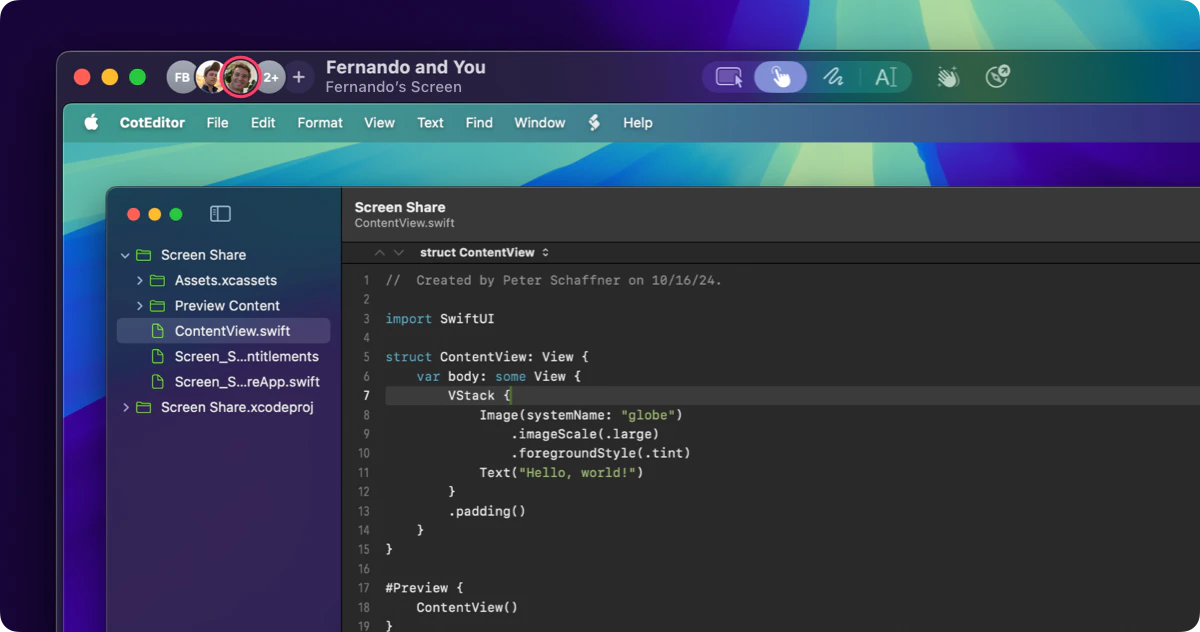
## New Screen Share Window
This release includes some big updates to the screen share window. We've redesigned it to make it easier to understand
what's going on in a call, and perform common actions like toggling your mute state or sharing your screen. You can read more about it in the [docs](/pairing-with-tuple/interacting-with-a-shared-screen).
 ## Other fixes and changes
* Fixed a race condition that stopped Tuple's windows from being excluded from the captured screen share video stream
* Added additional icons to indicate if leaving a call will end it, or if it will continue for other participants
* Added alerts when attempting to share a screen when another participant is already sharing
## Fixed
* Drawings are now correctly resized when resing the screen share window
* Emoji selector now doesn't incorrectly highlight the first emoji
* Cached avatars are now correctly refreshed
* Call participants cursors are now correctly shown
* Current user cursor now is correctly hidden if the mouse goes out of the view or the window is not key
* Closing and reopening the window doesn't cause video to freeze now
* The correct cursor is shown now when the mouse is over the webcam preview window if that window is on top of the screen share window
## Changed
* Call controls now have colors that match the macOS status item device activity indicators
## Removed
* We've completely removed support for the legacy audio engine on macOS 15. If this causes problems for you, please [contact support](mailto:support@tuple.app).
## Changed
* Updated our crash reporter, which has allowed us to catch more issues
## Fixed
* Regression that caused right-clicks to stop working in the "screen view" window.
## Fixed
* Fixed a faulty assertion which was causing runtime crashes
* Fixed a bug that was affecting the day counter for people who were in the middle of their free trial
## Changed
* Our crash reporter now catches more issues
## Fixed
* Bug that would show trial ends today on the same day a new account is created
## Added
* **Noise suppression**: we're pleased to announce the addition of another long-requested feature: background noise suppression! This is now enabled by default.
## Fixed
* Fixed sign-in issues when running Tuple as administrator
## Changed
* macOS 13 or later is now required
* Reduced jitter on calls with 4 or more people
## Fixed
* Crash which could occur when using certain firewalls
* Crash which could occur when handling remote copy/paste
## Fixed
* Intermittent audio delay that could occur when starting or joining a call
## Fixed
* Intermittent issue that causes the webcam window toolbar to get stuck in the visible state
## Webcam Window Polish
Over the last few releases of Tuple for Windows, we've added support for utilizing your webcam on a call, and for viewing other participants' webcams in a pretty rudimentary view. In this release, we've completely reworked the webcam window: it now floats above other windows, contains call controls (such a mute and screen share toggles), allows you to optionally view your own webcam, and just generally looks way prettier.
## Other fixes and changes
* Fixed a race condition that stopped Tuple's windows from being excluded from the captured screen share video stream
* Added additional icons to indicate if leaving a call will end it, or if it will continue for other participants
* Added alerts when attempting to share a screen when another participant is already sharing
## Fixed
* Drawings are now correctly resized when resing the screen share window
* Emoji selector now doesn't incorrectly highlight the first emoji
* Cached avatars are now correctly refreshed
* Call participants cursors are now correctly shown
* Current user cursor now is correctly hidden if the mouse goes out of the view or the window is not key
* Closing and reopening the window doesn't cause video to freeze now
* The correct cursor is shown now when the mouse is over the webcam preview window if that window is on top of the screen share window
## Changed
* Call controls now have colors that match the macOS status item device activity indicators
## Removed
* We've completely removed support for the legacy audio engine on macOS 15. If this causes problems for you, please [contact support](mailto:support@tuple.app).
## Changed
* Updated our crash reporter, which has allowed us to catch more issues
## Fixed
* Regression that caused right-clicks to stop working in the "screen view" window.
## Fixed
* Fixed a faulty assertion which was causing runtime crashes
* Fixed a bug that was affecting the day counter for people who were in the middle of their free trial
## Changed
* Our crash reporter now catches more issues
## Fixed
* Bug that would show trial ends today on the same day a new account is created
## Added
* **Noise suppression**: we're pleased to announce the addition of another long-requested feature: background noise suppression! This is now enabled by default.
## Fixed
* Fixed sign-in issues when running Tuple as administrator
## Changed
* macOS 13 or later is now required
* Reduced jitter on calls with 4 or more people
## Fixed
* Crash which could occur when using certain firewalls
* Crash which could occur when handling remote copy/paste
## Fixed
* Intermittent audio delay that could occur when starting or joining a call
## Fixed
* Intermittent issue that causes the webcam window toolbar to get stuck in the visible state
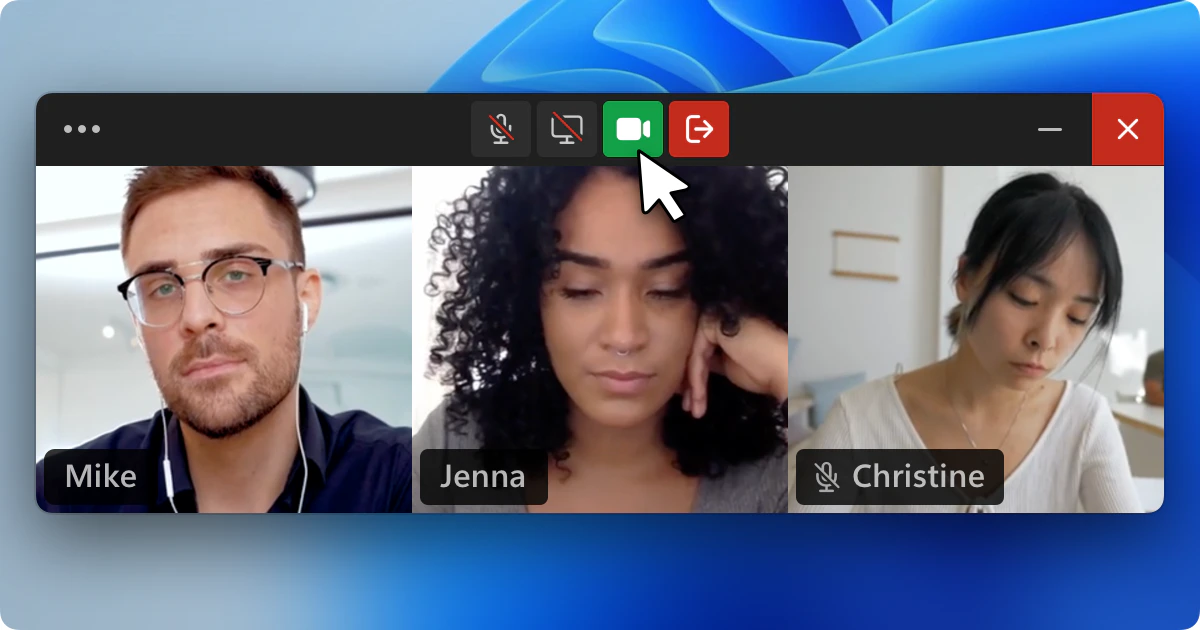
## Webcam Window Polish
Over the last few releases of Tuple for Windows, we've added support for utilizing your webcam on a call, and for viewing other participants' webcams in a pretty rudimentary view. In this release, we've completely reworked the webcam window: it now floats above other windows, contains call controls (such a mute and screen share toggles), allows you to optionally view your own webcam, and just generally looks way prettier.
 ## Fixed
* Fixed drag and drop handling in veiled applications
* Bug where Tuple would appear logged out when updated while sleeping
## Changed
* Connection sounds play at a more accurate time
## Added
* Added a menu to select which webcam to use directly within the popover
## Changed
* Screen share border color switched from red to "Tuple Purple"
* Video shared from local webcams is cropped to a 1:1 aspect ratio
* The "connected tone" is now only played when audio is fully connected
## Fixed
* Utilizing new rendering technique for systray icons / various button icons to smooth out rough edges
* Fixed bug that would retain pressed keyboard keys when screen view window loses keyboard focus
* Fixed intermittent errors opening the systray menu
* Smoother screen view resizing, and the window now stays within a monitor if applicable
* Re-added Tuple icon to welcome window animation
## Fixed
* Missing webcam menu within popover call controls
## Fixed
* Intermittent audio delay that could occur when starting or joining a call
## Fixed
* Crash due to race condition in call window cleanup
* Crash caused from missing light theme registry settings
## Added
* **Webcam sharing**: at long last, you can now share your webcam when you're on a call!
## Changed
* **New icons**: we've updated the app and systray icons to match our updated branding.
## Fixed
* Bug that caused settings to be stored incorrectly sometimes
* Audio errors not getting reported until the device is changed during the call
* Tuple using the wrong colored icon in the systray in certain configurations
## Fixed
* Echo which could occur when unmuting yourself in a call (macOS 14+)
## Added
* [Hardware mute controls](https://support.apple.com/en-us/102628) for AirPods (macOS 14+)
## Changed
* Mute/Unmute is now synchronized with the macOS recording indicator (macOS 14+)
## Fixed
* Audio issue where hardware may not work reliably after a call ends
* Crash which could occur when switching webcam views
## Added
* Screen layout is now remembered for call-related windows
* Key events are now discarded for remote control until frames have been received for at least a second
## Fixed
* Partial screen selector now works in all spaces
* Bad webcam quality when entering an existing SFU-backed call with webcams
* Call URLs now validate subscriptions correctly
* Screen share capturing incorrect resolutions on wide displays
## Removed
* Support for Audio Unit engine on macOS 12
## Added
* Local rendering for cursors, paint, and celebrations (on compatible clients)
* New app and menubar icons
* Better support for displays with separate spaces
## Fixed
* Regression where virtual audio devices would not appear as input sources
* Display picker now works more reliably
* Fixed issue where updates sometimes install while on a call
## Changed
* Refreshed about window
* Refreshed incoming call window
## Added
* Dialog window to select new audio device and/or reset audio when errors are detected
## Changed
* Converted additional prompts and message boxes to DirectX to create more consistency throughout the app
## Fixed
* Fixed critical issue to prevent RCE from malicious user data populating trigger environment variables
* Fixed intermittent issue where popover would be a blank white canvas
## Added
* Veiled windows can now be made visible temporarily
* Universal Links for call URLs
* Calendar integration
## Changed
* Ringtones no longer play in rooms
* Screen sharing border is now purple
## Fixed
* Copy/Paste in certain applications
## Fixed
* Long delays when connecting to a call
## Added
* Show webcams
## Fixed
* Taskbar should no longer be covered by other windows when sharing your screen
* Sharing an HDR monitor
* Reactions now use proper framerate and removed white flicker at the end
* Annotations will stay on top of other windows in more cases
## Added
* **\[beta] Audio Unit processing pipeline**: We've added a brand new Audio Unit-based processing pipeline. This pipeline is currently in beta, and can be enabled via settings. Doing so will yield improved vocal clarity, especially in noisy environments. This feature is only available on macOS Sonoma.
## Changed
* **DirectX Renderer:** We've switched from GDI to DirectX for rendering the Screen View Window. This substantially improves performance, and allows us to offload a lot of the heavy lifting to the GPU.
## Fixed
* Fixed an issue that caused certain cursor images to render incorrectly
* Key combos with Alt now work more consistently
## Added
* Credit based trials
## Fixed
* Webcams not capturing at max resolution sometimes
## Changed
* In-app onboarding checklist removed
## Fixed
* Crash when playing ringtone while the system default audio output device is inactive
* Reposition / update incoming call windows when monitors change
* Intermittent crash in keyboard layout query
* Intermittent crash caused by a race condition in keyboard hook
## Fixed
* Crash when frame from screen capturer is null
## Changed
* Removed onboarding checklist
## Added
* Open links from a guest while sharing screen
* "Persist drawings" setting
## Fixed
* Don't clear paint when switching between annotation modes
* Respect the guest's "Persist drawings" settings
* Crash when audio capture device reports timestamp errors
* Show and/or restore the "Screen View Window" when user clicks "Sharing their screen"
## Fixed
* Show the popover window even if Tuple can't get input focus
* Gracefully handle launching Tuple as a non-admin user when it's already running as admin
* Add a minimum time between HTTP posts to prevent high CPU/disk usage when network is down
## Fixed
* Fixed crash caused by receiving a copy/paste request from a guest with an empty clipboard
* Fixed intermittent crash when creating HTTP requests
* Fixed crash caused by moving mouse during a screen share
## Changed
* Webcam conversation mode image
## Added
* **Webcam conversation mode:** We've just added an enhancement to the webcam view; you can now expand it to see all participants laid out in a grid. We call this conversation mode.
Conversation mode can be great if you want to connect with your teammates before diving into some code, or if you do your one-on-ones or standups in Tuple. Just hit the "expand" icon in the toolbar of the webcam window to switch (Note: this feature is only available to folks on macOS Sonoma).
## Changed
* Improved CPU / network usage when video streams are not being consumed
## Fixed
* Annotations not working after un-minimizing the call window
* Cursor images sometimes not switching when mac hosts
## Added
* **Keyboard shortcut support:** You can now use keyboard shortcuts when connected to a Windows host, and when connecting to a macOS from a Windows client.
* **Shared copy buffer:** You can now copy text when connected to someone else's machine, and it will be present in your local copy buffer. Conversely, you can copy things locally and paste them into a shared screen on a remote machine. This works on macOS and Windows.
* **New audio engine:** we've completely rewritten Tuple's audio engine to make it more stable and reliable.
* **Keyboard layout translations:** Tuple should work consistently between pairing partners with different keyboard layouts.
## Fixed
* Tuple now responds to changing system audio devices
* Failed to install tuple error on systems with McAfee
## Fixed
* Memory corruption bug in audio clip render code causing various crashes
## Fixed
* GDI handle leak from cursor images
## Changed
* Sentry backend from breakpad (deprecated) to crashpad
## Fixed
* What's New items occasionally showing as "unread" after being dismissed
* Crash related to audio level monitoring
## Fixed
* Crash on certain systems due to unexpected audio device behavior
## Added
* **Room Subscriptions**: You can subscribe to rooms to get push notifications and / or a menu bar badge icon when your teammates are in a given room. No more FOMO.
* **Room Favorites**: You can now favorite the rooms that you use the most, and they'll stay pinned to the top of the Rooms tab. Hopefully this makes things less overwhelming if your organization has tons of rooms.
* **Team invite link in the popover**: it's now easier than ever to get your teammates set up on Tuple. Just copy the invite link and send it to 'em.
## Fixed
* Audio devices could be lost after the computer wakes up (macOS Sonoma)
## Added
* **Celebrations & Emojis**: you send 'em, and you can see 'em. Now you can join the party when your teammates are rejoicing.
* **Cursor images**: when both viewing and sharing screens, cursor images will be rendered correctly (i.e. if you're hovering in a text area, you'll see a caret).
* **Highlight Clicks**: you're now able to both send and view "highlight clicks" (aka the tool that draws a ripple around where you cursor is).
* **Room Favorites**: You can now favorite the rooms that you use the most, and they'll stay pinned to the top of the Rooms tab. Hopefully this makes things less overwhelming if your organization has tons of rooms.
* **Team invite link in the popover**: it's now easier than ever to get your teammates set up on Tuple. Just copy the invite link and send it to 'em.
* **New network settings**: We've added "Force TURN" and "Force Media Server" settings, which can be helpful in improving call quality under certain conditions.
## Fixed
* Call Feedback window should only appear when a screen was viewed during the call
* Bug that caused keystrokes to be sent when in an annotation mode
* Skinny borders while sharing screen on high DPI monitors
* Dark/Light flicker when popup is first shown
## Changed
* Switched from GDI to Direct2D for screen share graphics/animations
* Better looking graphics (antialiasing)
* Improved performance
* GPU offloading
* Upgraded WebRTC (M121)
* Revamped Logging
## Added
* Screen Share Menu
## Fixed
* UI Scaling for non-default "Make text bigger" system configuration
* Popover Window size slightly off causing unsightly borders
* Only allow 1 call feedback window
## Changed
* Incoming Call Window redesign
* Settings windows UI redesign
## Added
* New intuitive screen picker for multiple monitors
## Fixed
* Popover window gains keyboard focus when shown
## Changed
* Encoding settings for screen shares to improve quality
## Fixed
* App Veil reliability with background applications
* Screen share quality when sharing on Sonoma
* Crash when ending a call while receiving a screen or webcam
* Reconnecting banner
## Added
* Launch on boot with setting to disable
* Tuple registered as a program that can be removed
* Your computer will now stay awake after periods of inactivity when on a call
* Start menu shortcut
* "Share who I'm pairing with" preference, enabled by default
## Fixed
* Tuple comes up to a blank screen as of December 11
* Crash that sometimes occurs from closing the "Screen View Window" via the close button
* "Jagged Lines" while painting on "Screen View Window"
## Changed
* Rewrote our updater
* Call toolbar icons/buttons
## Fixed
* Invite view not showing a success/failure message
* Creating rooms with a '/' in the name
* Typing '/' in the search bar
* "Other teammates" count at the bottom of the contacts list
* Triggers undefined behavior/edge cases
## Added
* Mouse Scroll Wheel Support. Still known issues with acceleration values from macOS.
## Changed
* Use DirectX for screen capture instead of GDI. Less CPU and avoids "cursor flicker".
## Fixed
* Race condition that can cause the guest mouse/paint mode to be ignored when sharing from Windows
* Some cases where windows can't come to the front, fallback to flashing the window
* Intermittent crash on new calls
* Screen View Window buttons not visually responding to being clicked on slower systems
* Scale remote cursors up for higher DPI displays
* Keep the host cursor position up-to-date when the guest takes control of the cursor
## Fixed
* Accepting a request to join your call
* Display picker overlay not appearing until you exit/enter the screen
## Added
* Ability to exclude specific applications from your screen share: [App Veil](https://tuple.app/app-veil)
* A "What's New" section in the app with release highlights
## Fixed
* Crash when launching the app
## Added
* Echo cancellation
* Call Feedback window
## Added
* Welcome Window that shows user how to drag the systray icon to the task bar
* Main popover window is now shown on launch when the OS allows it to be in the foreground
## Fixed
* Intermittent audio/screen share failure on calls with 3 or more people
* More situations where the main popover window won't close when the user clicks away
* Automatic browser "sign in" on launch and "sign out" has been removed
## Changed
* Systray icon to be monochrome and responsive to dark/light themes
## Added
* New and improved trigger simulator window
## Fixed
* Triggers directory not being created when installing a trigger from the website
## Added
* Tuple Triggers! Check out [https://tuple.app/triggers](https://tuple.app/triggers) to get started.
## Fixed
* Crash on Sonoma when using AirPods
## Added
* VERSIONINFO to exe so windows shows "Tuple" instead of "tuple.exe"
## Fixed
* Popover not closing if user clicks on another Tuple Window (i.e. CallWindow)
* No more scary windows about modifying the registry
* Flickering controls in Screen View Window
## Changed
* Screen View Window revamped
* toolbar UI redesign
* window comes up centered and sized appropriately
* toolbar scales up for higher DPI displays
* UI Font from SystemFixed (Arial) to Segoe UI
## Added
* "Triggers" beta!
## Fixed
* Users not sharing who they're pairing with will now show as a separate ongoing call
* Incorrect tooltip on call/join button
## Added
* Multi-session support is now generally available
## Added
* In-App Updates
* Tuple now registers itself as an application so it can be found by searching in the Start Menu
## Fixed
* Multiple Systray Icons if Tuple process exits without cleaning up
## Fixed
* Crash on webcam selection screen when your current device fails to record
## Added
* Support for macOS Sonoma!
* Ability to add someone to your contacts from the in-call view
* Keyboard shortcut for starting a partial screen share while in a call
## Changed
* Login window will always show on launch when unauthenticated
## Fixed
* Preserve the menu bar item's position between launches
* Scrollbars not updating color when the system appearance changes
* Screen sharing border not fitting to the corners when sharing alone in a room
* Tooltip copy on an ongoing call you're in
* When ending a call, prevent clicks from accidentally calling someone else
* Considering rejected calls as missed calls
* Missed/rejected call NSAlerts blocking incoming calls
* Command+tab reliability while receiving a screen
* Inconsistencies when removing a contact
## Added
* Systray Icon now shows when you're in a call
* An installer that contains a compressed executable bringing it down to 11 MB from 40 MB
* Manual Dark Mode setting
## Fixed
* Multiple Tuple instances running simultaneously
## Changed
* The microphone inactive alert will no longer block you from accepting incoming calls
## Fixed
* Mouse/border position errors and performance improvements with scaled monitors
* FPS limiter when sharing screen
* Notification Icon will be recreated if explorer crashes/restarts
## Changed
* When the popover is closed for more than 10s while on a call, you'll be taken back to the in-call view upon reopening
## Added
* Able to receive/handle a share screen request
* Separate log file names based on the process "run mode" (i.e. tuple.log vs tuple-openurl.log)
## Fixed
* Redact auth token from logs
* HTTP client no longer leaks
* More consistent message box/prompt UI
* Connected ringtone played at the wrong time
## Changed
* Rooms feedback banner text
## Added
* A fun celebration when you complete onboarding
## Changed
* Rooms are now enabled for everyone!
## Fixed
* Searching for contacts by email
* Searching for contacts with names that have accents
* The button to leave a room will now say "Leave" instead of "End Call"
## Changed
* The alert that your default mic is disabled will no longer stop you from accepting the call
## Added
* Rooms beta! Reach out to ‘[support@tuple.app](mailto:support@tuple.app)’ if you'd like to try the feature out.
## Changed
* Maximum number of people on a call is now 10
## Fixed
* Status bar icon showing a notification badge with no notifications in the UI
* Showing the in-app onboarding steps in the contact search results
* Call window screen resolution setting having no effect on certain screens
## Added
* Missed call notifications in the popover UI
* New user onboarding in the popover UI
## Changed
* Improved contrast in user avatars
## Fixed
* Bring back the "Switch Screens" button when sharing with multiple monitors
## Added
* Support "Force Click" when controlling a mac host
## Changed
* Webcam views will now sit in front of full screen apps
## Fixed
* Webcam views not restoring their previous position
* Tooltip on copy call link button while in a call
## Added
* Performance improvements for the new UI
* cmd+o will now navigate to the ongoing call view
* Call URL Permissions, "Closed" or "Open" which allows teammates join without approval
## Changed
* Text annotations now appear on the host's screen for longer (when auto-clearing)
## Fixed
* Remote mouse events are now correctly passed through excluded windows when hosting
* The connectivity health icon will now display the correct health level
* Friends outside of your team will no longer appear in the team directory
* Clicking the "Join call and copy link" button now actually copies the link
* Previous host paint lines not clearing after disabling paint persistence
## Changed
* Tweaks and bug fixes for our redesigned UI! (currently in beta)
## Added
* UI redesign behind a feature flag. Reach out to ‘[support@tuple.app](mailto:support@tuple.app)’ if you'd like to try it out! 😎
## Changed
* The "About" window can now be dismissed with Escape
## Changed
* Network adapters now prioritize more optimal interfaces (🤓 we'll prefer ethernet over WiFi)
* Upgraded WebRTC
## Fixed
* ⌘ + z and ⌘ + Shift + z now work while writing [text annotations](/pairing-with-tuple/interacting-with-a-shared-screen#text-annotation) so you can undo and redo while you're actively editing 📝
## Removed
* Gray paint mode/annotation color... it was too hard to see on dark backgrounds 👀
## Added
* Text annotations
* Keyboard shortcuts to switch between drawing (D), text (T), or highlighting (H) while annotating
## Changed
* Noise suppression will now default to enabled.
## Fixed
* The "Call Back" button in the missed call notification not calling people back
* Webcam picker now handles empty lists more gracefully
* Menu bar item hijacking clicks after a call ends
* Possible overflows of heap allocated data
## Fixed
* White noise/static issues on calls without background noise suppression
* Searching for people in your contact list or when adding someone to a call is now waaaaaaaaaaay faster for large teams
## Added
* Background noise suppression (off by default)
## Changed
* Reduced CPU usage when synchronizing mouse events while hosting
## Fixed
* Calls no longer end when a person using an old version joins
* More people can now be added to a URL-based call after the owner leaves when SFUs are enabled
* The "P2P Connection" label in call stats will now show the correct value
## Added
* Your self webcam view will now be like looking in a mirror
* Refreshed call stats view, with live charts and history!
## Fixed
* Leaving a call before the owner of the URL joins
## Added
* Keyboard shortcuts in popover
## Changed
* Tuple now supports up to 6 users on a call. We're rolling out access to this feature to teams. To request access, reach out to [support@tuple.app](mailto:support@tuple.app).
## Added
* Introduced a new beta for mobbing (adding more than 3 participants to a call). Reach out to '[support@tuple.app](mailto:support@tuple.app)' to request access! 😎
## Added
* "This Is Fine" reaction
* Holding shift while drawing will now produce straight lines
## Fixed
* Occasional crash when opening a call URL twice
* Sharing a very small portion of your screen not working
* Mac sending unintentional super key to Linux
## Changed
* Multicursor is now the default cursor mode on a fresh install
## Added
* Make contact list search field keyboard navigable
## Fixed
* Mouse sometimes disappearing when moving outside the Tuple window
* Host not seeing the "Reconnecting..." view when a participant disconnects for the first time
* 3rd person's paint not being removed when they leave the call
## Added
* Call links: you can now copy a link from the app to share it with your teammates. Anyone clicking the link will be directed to your call. [Learn more](/pairing-with-tuple/joining-a-call-via-a-linkurl)
* Webcam self-view: you can now see your own webcam feed persistently on your screen. You can change its appearance (hidden, small, big) as well as set the webcam layout to horizontal or vertical. [Learn more](/pairing-with-tuple/sharing-a-webcam-video#self-view)
* Emoji reactions: we added emojis to the Reactions menu. [Learn more](/pairing-with-tuple/interacting-with-a-shared-screen#reactions)
## Added
* The ability to change shared webcam in use without stopping sharing.
## Changed
* Upgraded to the latest version WebRTC.
## Fixed
* Several small webcam related issues.
## Fixed
* Crash which could occur when audio devices change while preferences are open.
* Several small UI issues.
## Added
* Dark mode 🌚.
## Changed
* The UI will now automatically recover from certain exceptions.
## Fixed
* UI issue.
* Preferred webcam not being respected in some cases.
* Preferred audio output device not being respected by call ringtones and notification sounds.
* Crashes related to audio devices changing media formats.
* Crashes when sending certain URLs to the host.
* Improved webcam FPS for certain cameras.
## Fixed
* Small bug fix.
## Added
* Support for call URLs in Beta. Reach out to [support@tuple.app](mailto:support@tuple.app) if interested in
trying it out.
## Changed
* New and improved UI.
## Fixed
* Mics with large numbers of channels can now be used with Tuple.
* Bug causing mic to fail when certain USB devices were present.
* Sending cut/copy/paste to a host using Dvorak.
* Memory leaks.
## Fixed
* Sound check will now let you select a specific line on your multi-input mics.
* Hotkeys that involve the arrow keys should now work properly.
* Users on cancelled teams are now able to log in again.
## Changed
* Upgraded to the latest version WebRTC.
## Fixed
* Key combos like 'shift + shift' in IntelliJ should now work properly.
## Added
* In-call notifications now play a sound.
* Webcams have their own section in preferences.
## Changed
* Webcam previews can be turned off.
* Unified macOS to use the new cross platform engine.
## Fixed
* Certain key combinations between US and Swedish layouts.
* Control+left click will now clear away paint.
## Fixed
* Crash related to new health check feature when one participant was reconnecting.
## Fixed
* Crash when opening preferences.
## Added
* Connectivity stats view to the menu bar UI when in a call.
* Ability to request to join calls which are in progress.
* UI to ask call participants to share their webcam/screen.
* UI shows which user is currently signed in.
## Fixed
* Removing a friend not being reflected in the UI immediately.
* Remote scrolling is now compatible with Xcode's view debugger.
* Allow selecting display over full screen apps.
* Found bug with audio dropping during a call.
## Changed
* Set a minimum FPS on screen capturer to keep the pipes warm.
* Now using PKCE authentication flow based on security researcher feedback.
## Added
* New preference to toggle showing the call feedback form
* Option to suggest a reaction in the reactions list. Send us your best reaction suggestions!
## Fixed
* Tuple should now work more reliably in certain VPN environments.
* Prevent multiple call feedback forms from popping up.
* Friends no longer disappear when they go offline.
## Added
* Button to stop sharing your screen in the display dropdown.
* Slight delay before command+w can dismiss an incoming call.
* Ability to see who your friends are pairing with
* Preference to opt-out (General > `Show my friends who I'm pairing with`)
## Fixed
* Crash when trying to enable webcam with multiple devices with the same name.
* U.S. International - PC layout users can send the dead key characters.
* Unusable "Add Participant to Call" view when sharing webcam on a small display.
* Host's cursor still showing after leaving the shared area in tag-team mode.
## Security
* Minor fixes based on feedback from recent penetration test.
* Add stricter validations on URLs sent from guest to host.
## Fixed
* Xcode shortcuts for Japanese/Chinese keyboard layouts.
* Host's cursor position not getting sent to guests when sharing an external display.
* Audio echo which could happen when the third peer leaves a call.
## Added
* A new configurable hotkey to quickly open the Tuple popover in the status bar.
## Fixed
* Crash related to Firebase dependency we needed to patch.
* Crash related to screen switching.
* Improvements to Japanese keyboard layouts.
## Added
* Receiving a peer's webcam while hosting is now up to 3x more efficient.
* A soothing spinner when waiting for a pair's screen to appear.
* Pairs who disconnect unexpectedly will be called back automatically.
## Changed
* Optimized video encoding pipeline for faster encoding/rendering times.
## Fixed
* Resolved a bug that could cause a crash immediately after accepting a call.
* Typing in a help dropdown when controlling your pair's computer should work in most cases.
* Navigating a context menu with arrows keys should no longer cause the menu to freeze.
* Typing in a Virtualbox VM when controlling your pair's computer should work.
* Dvorak command+shift+- and command+shift+= now do the right thing.
* Spanish ISO keyboard users can type characters that require the option key into VIM when the host is also using Spanish ISO.
* The "Share Webcam" button will no longer appear when you're already sharing your webcam.
* Reduced time to begin rendering remote screens under certain conditions.
* Resolved a bug that could crash your pair when the host's cursor image changed.
## Fixed
* The incoming call modal will correctly pop up in front of other active applications
* No longer become unresponsive when waking from sleep.
* No longer become unresponsive when a macOS system service is down.
## Added
* New ASCII table flip animation for when things get frustrating (╯°□°)╯︵ ┻━┻
## Fixed
* Crashes related to a new dependency we added.
* The "audio mic unavailable" alert should no longer incorrectly pop up for folks on iMacs.
## Added
* New warning for when the built-in microphone is being used and laptop clamshells are closed.
* Experimental beta presence side car which can be enabled in Preferences > Debug > Use New Signaling.
* Hotkey for quickly opening Call Stats.
* A new button to quickly share your webcam when someone else shares theirs with you.
## Changed
* Reduced the CPU usage in capture code by \~20-40% on average. We're now leveraging the GPU even more and reducing unnecessary work on CPU. Huzzah!
* The "Send Link" button on the guest toolbar will now be disabled when the host has automatic link sending disabled
## Fixed
* Minor layout bug in the preferences.
* Controlling a pair's screen while using the Dvorak layout will now respect modifier keys (like control).
* We now respect cmd + option + c and cmd + option + x key combos.
* Tuple will no longer remain active after a call ends on Big Sur when the open url window is open.
* Better detection of audio device changes when using devices with zero channels.
## Changed
* To avoid confusion, 'End Call' button will now say 'Leave Session' when in a multi-participant call.
## Fixed
* Audio could occasionally cut out due to a race condition when adding a new bluetooth device.
* 'Do Not Disturb' should now work properly on Big Sur (macOS 11.5>, please upgrade if on lower Big Sur version).
## Added
* Autosave name to our status icon in hopes of working with Vanilla.app more effectively.
## Fixed
* Webcam windows can now be made larger for real (lol git merge, sorry folks).
## Fixed
* Bug related to signing in with incorrect team owner.
* Edge cases around presence being off.
## Added
* New celebration mode called 'Ship It'
## Fixed
* The wrong alert was shown when someone didn't pick up a call.
* Reconnection logic which could have caused you to stay offline.
## Changed
* Webcam windows can now be made larger.
## Added
* Missed call notifications.
## Added
* Webcam support for multiple people.
* Screen switching for multiple people.
* Audio-only calls for multiple people.
* New menu bar UI!
## Fixed
* Calls no longer end when certain peers are disconnected.
* Popover UI now correctly tracks its hover state.
* Screen sharing uses less CPU after a pair's webcam is turned off.
* Bug where Tuple wouldn't remember your preferred audio device.
## Changed
* Calls no longer end when you close your pair's shared screen window.
* Tuple's Dock icon stays visible while in a call.
* Anyone can add/remove a third person to a call.
* Anyone receiving a pair's screen can restart the call.
* Sharing your screen while your pair shares their webcam is now 10% faster.
## Fixed
* Resolved bug where the popover could get stuck in a 'Connecting...' screen.
## Added
* Sign-in now uses your browser to make it easier to get started.
* New UI for requesting missing permissions.
* Hotkey for being able to quickly hang up a call.
## Fixed
* Bug with showing disconnected window too eagerly.
## Fixed
* Partial screen selection toolbar is now clickable when covered by the current selection.
* Screen sharing after switching GPUs on MBP/Big Sur will no longer get stuck in an error loop.
## Added
* We now support partial screensharing.
## Changed
* Webcam streams now scale to fill the window (on the receiving side).
* Tuple now connects much quicker after losing internet access.
* Tuple launches a bit faster than before.
* Auto-login now waits for your internet to be reachable.
* Errors which occur during sign-in are now a bit more precise.
## Fixed
* Crash which could occur if on a network which hijacks HTTP responses (e.g. public WiFi with a web login interface).
* Regression where friends who are your teammates would also appear in the teammates section.
* Fixed bug where Tuple may need to be restarted after waking up from sleep.
* Friends who are busy on a call are now shown consistently in the UI.
* Failed SSO logins no longer put the app in an unusable state.
* Contact list is now more responsive for large teams.
## Added
* We now support cmd + x to 'cut' content from one machine to the other.
## Added
* Tuple now recognizes virtual webcams. Tools like [camo](https://reincubate.com/camo/) should now work with Tuple.
* Improved copy/paste between machines. You can now cmd + c and cmd + v to sync content between machines.
## Fixed
* Webcam capturing now uses less CPU by sharing GPU memory. Additionally, start up time for webcams should be much snappier.
* Sometimes Tuple windows were unclickable after transitioning to the foreground.
* Adding an observer now works much more reliably.
* Mouse events outside the contents of a call window are now properly ignored.
* When the 'Play ringtones' setting is turned off you'll no longer hear the connection connected/dropped noises.
* Cursor is no longer hidden while painting in full-screen call windows.
* Popover offset on Big Sur will be properly centered.
* Popover arrow will now match the correct purple color.
* Issue where you could no longer scroll popover after viewing Headway on Big Sur.
## Changed
* Send clipboard feature has transformed into a send url feature. URLs will continue to automatically open when the host has the setting turned on.
* The default cursor mode will be multi-way for new folks using Tuple.
* Moved internal networking APIs and models to C++ in preparation for the Linux app.
* Tuple now only supports macOS 10.14.4+.
## Fixed
* Memory no longer leaks while in a call or when transitioning online/offline.
* Issue where a black screen would appear if the host's GPU switched while sharing.
* Regression where preferred audio device(s) were ignored after the first call if they weren't Bluetooth.
## Changed
* Improved app update flow in the background so folks will be disrupted less when new versions of Tuple are released (will start in V83).
## Fixed
* Issue leading to one key stroke being multiplied into many.
## Added
* Double click when in paint mode will show the old highlight circle animation
* Highlight click is back!
* Celebration will shoot out snowflakes for the rest of the month! Happy holidays everyone.
## Removed
* Audio will never pan right. This optimization wasn't worth the confusion.
## Fixed
* We won't forget your preferred cursor mode when an observer is in the call anymore. We promise.
* Colored cursor behavior is now more consistent within the screen sharing window
## Added
* Everyone can now see who's in a 3-way call
* Host can now 'kick' an observer out of a call in the popover UI
* Observers can now highlight, paint, and send confetti/clipboards in calls
* Observers can now use multi-cursor to take action on the hosts computer
* Observers can now send keystrokes through to the hosts computer
## Changed
* Mouse events are now sent between peers more efficiently
## Fixed
* Dual cursor mode now works with all mice
* UI no longer blocks when webcams start capturing
* Redesigned preferences window
* Potential crash when audio devices become unavailable
* In-call toolbar looks a bit nicer on Big Sur
## Fixed
* Tuple no longer needs to be restarted if a microphone is reconnected while Tuple is running. Yikes!
## Fixed
* Overly zealous mute/unmute detector putting folks into a state where they couldn't unmute themselves
## Added
* System audio settings are now bound to Tuple's audio configuration
* A high resolution webcam mode
* Dynamic webcam resolution based on the size of the window the peer is viewing
* Ability to send confetti to the host machine for celebrations 🎉
* Notification that keyboard is off when typing and it's disabled
## Fixed
* Preferred audio devices now populate correctly in preferences
* Chipmunk audio. If you know what that means, you'll be as happy as we are 🐿
* Properly stop the ringtone when two unpaid users call each other
* Changes to preferences are now applied without requiring the app (or call) to restart
* Issues with the auto upgrading
## Changed
* Default webcam resolution to be a bit higher
## Fixed
* Issue causing browser tabs to open because of Headway
## Security
* Fixed a rare race condition on observer hanging up that could lead to audio connection between the guest and observer to persist.
## Added
* Support for cmd+shift+tab
* Better looking UI for Big Sur--more improvements to come!
## Changed
* Upgraded WebRTC
## Removed
* A number of dependencies reducing overall bundle size \~60MB
## Changed
* Improved rendering by triple buffering GPU display buffers
## Fixed
* Glare caused when two peers call each other at the same time now has predictable behavior (and doesn't crash!)
* Webcam preview window has a more responsive UI, which no longer shows devices that aren't available
* The in-call webcam window now remembers its position on your screen
* Incoming call window can now be closed (which ignores the call rather than declining it)
* Fixed a bug where stale incoming call messages may unexpectedly appear
* Fixed deadlock which could occur when modifying screen sharing state with a full video buffer
* Crash related to guest toolbar when it was small and a new cursor mode was selected
* Observers who cancel incoming calls no longer cause others to be disconnected
* Crash related to cancelling an outgoing call when the network is laggy
* Fixed unexpected behavior when devices are woken up by network activity
* Fixed a deadlock related to webcam
## Fixed
* Bug when turning on Host paint leading to strange remote control issues
## Fixed
* Bug related to GPU switching. The UI would show 'Switch Host' instead of 'Stop Sharing' when switching from the integrated to the discrete GPU.
* Crash related to remote control typing and Japanese keyboards
## Added
* Webcam window is now automatically excluded from screen sharing output
* Double-clicking a rating in the call feedback form will submit the rating automatically
* A new Tuple preference setting to turn off the red corners when hosting a session
## Fixed
* Webcam window now works across multiple spaces (and fullscreen apps)
* Webcam automatically starts for audio-only calls when enabled in preferences
* Show missing button for inviting friends in the UI
* 'Persist Paint' Tuple setting should now always work
* Issue with keychain affecting folks who sign in via SSO
## Changed
* Host clicks in tag team mode now follow the same behavior as the guest when taking control
* Tuple now follows standard app/window switching behavior and has keyboard-friendly windows
* Guest keyboard events are now sent to the host whenever keyboard control is enabled and the
screen window is focused.
* Host screen now has configurable red corners to indicate it's being displayed
* 'Persist Paint' Tuple setting will be applied to local painting as well
* Call feedback can be submitted by double-clicking a rating
## Fixed
* Crash on High Sierra
## Added
* The ability for teams to opt-in to a mode which allows them to pair only with teammates
* Support for alternative mouse clicks (back, forward, etc)
* Redesigned call feedback window
## Fixed
* Issue that could cause cursor offsets and paint appearing on the wrong display
when using multiple monitors and a hiding dock.
## Added
* Utilities for helping debug non-standard network configurations
## Fixed
* Not allowing calls to be made when Tuple thought it wasn't connected to the
internet but really was.
## Changed
* Using new hand tuned binary codec for common events. Results so far: \~10x
bandwidth savings, 3x faster encode, and 6x faster decode 🏎
## Changed
* Improvements to bandwidth consumption when using webcam.
## Fixed
* Bug with cursor offsets being incorrect when hiding/showing dock.
## Added
* New and improved UI for everyone!
## Added
* New UI: display when a user is in a call with a yellow circle
* New UI: cmd + , will now open the preferences when the UI is visible
* New UI: refine cursor hover states to make it more obvious what's clickable
## Fixed
* New UI: error page showing when there wasn't actually an API error
* New UI: use the correct team name in the invite flow
* Caps lock works properly when doing remote control
## Security
* Prompt for confirmation before initiating calls with tuple deep links
## Added
* Beta test for our new UI. If you're interested in joining the beta reach out to '[support@tuple.app](mailto:support@tuple.app)'
## Changed
* Ported everyone over to new signaling backend
## Fixed
* Link for SSO and forgot password incorrectly opening a browser tab.
## Added
* Reconnecting view when in an audio only call/observing.
## Fixed
* Red flickering of the call connected window due to silly macOS animation API's being old.
* Red border around screen being shown at an incorrect time when the webcam video was closed.
* When automatic webcam is enabled ensure that we respect the preferred webcam previously selected.
* Cursor offset that could occur when using host paint mode.
## Removed
* Previously, if your pair had your webcam displayed on the screen they were sharing, we covered it with a mask before sending it to you to minimize distractions. Unfortunately, this feature was highly confusing and led to many bugs. We'd like to rethink webcam sharing in the future, but for now we've removed the masking. In the meantime, if you find seeing a delayed version of your webcam distracting, we recommend asking your pair to move the webcam window to a second display.
## Changed
* Sound Check will properly show muted state based on the microphone level and
the audio stream. Prior to this change, the 'mute' keyword was just based on
microphone level.
## Fixed
* Display disconnected alert showing at an incorrect time.
## Fixed
* Screen freezing bugs due to GPU switches and monitor unplugs.
* Webcams being plugged in or removed after app boots will properly appear in preview list.
## Security
* Ensure all mesh audio connections get destroyed even under rare circumstance
of signaling being down when a call ends.
## Fixed
* Host paint on a secondary display
## Fixed
* Removed redundant transparent window to avoid excessive CPU usage.
## Fixed
* Code that broke screensharing on High Sierra.
* Crash that could occur when making a call and disconnecting from the WebSocket signaling server.
## Changed
* Noise Tuple makes when calls connect to avoid confusion with call ending sound.
## Fixed
* Race condition identified by the one and only Adam Wathan. When receiving a
call in the display selection process it could put the app into a very
very broken state.
* Crash that could occur with incorrect URL parsing in clipboard sharing.
## Added
* Host side paint mode 🎨. You can now set a hotkey which puts you into a mode
where can paint on your display when hosting a session. Clicking 'Escape' or the Tuple
icon will exit paint mode.
* Status bar icons for toggling mute and host paint.
## Added
* Subtle beeping sound when calls connect to help folks know when an audio call has begun.
* Include 'email' in the user search.
* Open popover the first time the app is downloaded and started.
## Changed
* Changed the underlying system we use for hotkeys. The old system used some
hacky private API's that weren't fully understood. Using those private APIs had unintended
consequences like hijacking all Command+Space|Tab|etc. combos. The new
system is a battle-worn library recommended by our new macOS specialist.
## Added
* Tooltips for icons in the popover
## Changed
* Migrate everyone to the new WebSocket backend. Faster and more reliable connections, huzzah!
## Fixed
* Bug related to string parsing incorrectly
* Crashes related to dual cursors
## Added
* Sign in with SSO in popover UI
* Longer SSO session persistence
## Fixed
* Search improvements
## Fixed
* Magic sign in not working properly
* Bug with adding observers when users weren't friends
## Fixed
* Crash related to webcam on 10.15.3
* Crash related to closing guest window on 10.15.3
* Issue related to not seeing incoming call window in new WebSocket backend
## Fixed
* Open correct pane when requesting Screen Recording permission
* Command + Tab being broken after Tuple calls end
* Crash related to adding friends when our API is unavailable
* Crash related to switching to and from dual cursors
* Paint not properly disappearing when switching cursor modes
* Don't allow SoundCheck to open unless audio permissions are okay
## Added
* Real time updates for when new team members join
## Changed
* Default the UI theme to 'dark' instead of 'auto'
## Fixed
* Crash related to the new WebSocket backend getting auth tokens
* Crash related to old WebSocket backend
## Fixed
* Scaling issues with availability
## Changed
* New WebSocket backend to improve latency and reduce down time
## Fixed
* Screen freezing caused by last release
## Added
* Warning when trying to call someone via Alfred.app workflow when already in a call. Who would try such a thing!? ;)
* Deep link to confirm if Tuple is online and ready to make calls (used in Alfred.app integration)
## Fixed
* Bug involving the wrong display sometimes being shared
* Crash related to dual cursors
## Added
* Warnings for when account subscriptions are not in good standing
* Feature flag for testing new logging backend
## Fixed
* Copy for screen recording permission prompt
* Tuple preventing screen from going to sleep in certain situations
* State bug preventing 'Share Screen' button from properly initiating the share
## Added
* Performance wins on render
## Changed
* Updated a dependency that was leading to some crashes
## Fixed
* Cursor offset bugs with tag team and dual cursor modes
## Changed
* Upgraded a number of dependencies
## Fixed
* Crash related to sound check and no microphone available
* Cursor offsets appearing when folks have second display above or below and not left or right for highlight click and paint mode. Note: still cursor offset issues on tag team and dual cursor modes--fix coming soon
* Sound check breaking audio
## Removed
* Wiped all default hotkeys. Folks will need to reset their desired combos (we're really sorry about this and will handle hotkeys better in the future!)
## Fixed
* Crash fix related to new release
## Fixed
* Bug where cursor moves would appear when sharing a side display
* Issue with the wrong screen sometimes being shared
## Added
* Sound check
## Changed
* Frequency of performance reports
## Fixed
* Memory leak associated to availability
## Fixed
* Crash related to race condition with failed connections when observer is present
* Crash related to WebRTC webcam capture code creating a retain cycle
* Crash related to WebRTC render code dereferencing a nullptr
* Crash related to race condition in screen selection
* Observer state issue preventing screen swapping in rare circumstances
## Changed
* App no longer regularly restarts every 7 hours
* Improvements to availability to prevent calling people who are not really available
## Fixed
* Crash related to sending clipboard content to peer
* Crash related to stopping screen share
## Changed
* Only fetch feature flags on sign-in
* Default keyboard mode to "off"
## Added
* Persistent paint mode where paint will no longer disappear until right clicked. Can be found in Tuple Pref > General
* Show incoming call window on every display and screen so it's easier to find
* Better errors and warnings when proper Tuple permissions are not enabled by the OS
## Fixed
* Bug where webcam overlay was persisting even when minimized
* Launch at login not being re-enabled after automatic app updates
## Changed
* Call stats menu now opens from a click instead of hover
## Changed
* Reduce resolution of webcam to conserve CPU usage
* Improvements to screen capturing to reduce CPU usage
## Fixed
* Bug with pixel buffer not always being overwritten properly in webcam
## Fixed
* Updated audio device handling to avoid crashes
## Added
* Audio only calls
## Fixed
* Small issue with cursor type being out of sync when starting a call and the cursor is hovering over area of guest window
* Double red flash that occurs sometimes when making calls and screen is being shared
## Fixed
* Don't send hotkey combinations to host (e.g. mute hotkey)
* Whitespace trimming on emails when inviting teammates or adding friends
## Added
* Better diagnostics to help user debug issues
## Fixed
* Notarization issue with Apple on Catalina
* Don't send hotkey combinations to host (e.g. mute hotkey)
## Added
* Better analytics for debugging slack integration
* Right-click now removes any paint messages on the screen
* Audio device selection
## Fixed
* Sending email to clipboard incorrectly interpreting as mailto link
* Delay when command tabbing into Tuple
* Users getting stuck in fullscreen mode
## Changed
* Default cursor mode will now be paint
## Changed
* Update to WebRTC version M77
## Fixed
* Mouse moves getting offset when guest is in control when folks resize display mid call
* Crash associated to race condition with the paint mode
* Fixed bug with transmit resolutions getting out of sync
* Reboot audio module when waking up from sleep to fix sporadic issues
## Changed
* Behavior of transmit resolution setting will now be based on the guest's setting and not the host's
## Fixed
* Dual cursor warping issue when sharing secondary display
## Fixed
* Improved availability issues
* Bug with host losing control of mouse
## Fixed
* Crash associated to trying to add web cam when no valid video devices are found
## Changed
* Improved host switching to not drop calls
## Added
* Deep linking enabling an Alfred workflow for starting calls
## Fixed
* Issue with command click/double click when in dual cursor mode
* Cursor paints no longer being visible after closing webcam view
## Changed
* Incoming call window will now always be on top
## Fixed
* Crash associated to retrieving mouse acceleration curve for dual cursors
## Changed
* Webcam preview will now be properly mirrored
* Webcam window will always be pinned on top but can now be minimized
* Webcam window can be resized to any size
* Closing the webcam window will now stop sending the stream
## Removed
* Removed webcam video control buttons in favor of native macOS window buttons
* Removed webcam window exclusion in favor of blacking out buffer for perf wins (white when in light mode and dark grey when in dark mode)
## Added
* Camera preview in the menu bar UI when sharing your webcam (properly mirrored)
* Preference to be able to automatically start calls with webcam on
## Fixed
* Hotfix for toggle mute hotkey not working navigator side in certain situations
## Fixed
* Edge case when selecting webcam device but it becomes unavailable or gets unplugged
* Analytics tracking giving incorrect numbers
* Crash associated to metal view constraints being incorrect
* Crash associated to race condition on signaling and call start/end times
## Changed
* When searching for users in UI it will only show folks who are currently available for calls
* No longer show the 'Add Webcam' button in the UI when observing (since it does nothing)
* Streamlined call feedback form
* Internal refactor to clean up an unnecessary transparent window
## Added
* Hotkey for quickly muting/unmuting - command + option + m
* Dual cursors mode with mouse acceleration
## Fixed
* Focus ring around the cancel/start buttons in the camera preview
* Ensure when a call is started the guest window always gets brought to the front
## Added
* IPC notifications that get dispatched when a call starts and ends
## Fixed
* Regression introduced when adding face cams that made sharing second monitor totally broken
## Added
* Basic webcam support between guest and host. **NOTE**: leaving the face cam window on the same display that is being streamed will degrade the performance of Tuple.
* Tuple becomes command + tabbable whenever video is being shared.
## Fixed
* Caching issue with visiting changelog -> call stats not redirecting to call stats
* \`Command + \`\` not properly cycling through Tuple windows when keyboard sending is off
* Slight offset when rendering host cursor image on the guest screen. Should now be pixel perfect
## Changed
* Clicking the Tuple icon in the top menu bar will bring all Tuple windows to the front
## Changed
* Reduce time to check for app updates to every hour. Force all clients to do updates in background to prevent updates being required when starting calls.
* Number of thread optimizations based on what computer is hosting
## Added
* Ability to add friends who are not on your team
* Adds changelog back into the app. So meta.
## Fixed
* Search bar should now always auto focus when main UI is opened
## Fixed
* Overly-sensitive scrolling on trackpads
* Analytics was missing some preferences
## Added
* Shows offline users who are on your team or friends list
## Changed
* CPU setting from 7 to 8 to reduce encode times
## Added
* Link to the team management page if signed in as team owner
* Link to help docs for Preferences from Preferences window
* Link to help docs in the nav toolbar
## Changed
* Moved Launch at Login preference to General tab
## Fixed
* Title of General tab in Preferences
* Frame rate bug of going down super low when screen wasn't changing
## Changed
* Always show multi way even if feature flag is not enabled
* Stop closing the call stats window at the end of a call
## Fixed
* UI bug when observer rejects call
* Driver mouse moves on local windows when in highlight click or paint mode
* Crash when using certain keyboard modes
## Added
* Auto upgrades in the background
## Changed
* Cursor moves to center when guest hangs up and was in control
* Text on share screen button based on if driver or navigator
* Lowered logging to prevent filling up Timber
## Fixed
* URL encoding on emails with '+' when submitting feedback
* Mute icon syncing issue when doing automatic host switching
* Handling of dead keys for typing some non-qwerty characters
## Added
* Fullscreen when observing
* Show who is observing in the UI
## Changed
* UI now in React
## Added
* Dark mode for Mojave users
## Changed
* Call tracking analytics to be more accurate
## Fixed
* Do Not Disturb setting checkbox out of sync
## Added
* International keyboard support
## Changed
* Underlying logging from Logz.io -> Timber
## Added
* Preference to control whether links sent through clipboard open automatically (anti-rick-roll measures)
* Preference to disable Do-Not-Disturb management (e.g. if user likes to keep it on)
## Fixed
* JSON Encoding bugs with users who have a ' in their name
* Issue where action cable would get stuck in infinite reconnecting state
* Call stats can now be moved to different displays
## Fixed
* Video freeze when playing video in non-shared display
## Changed
* Call feedback form to have segmentation
## Added
* Restart call button to the navigating toolbar
* Ability to abort screen selection when pressing 'escape'
## Changed
* Keyboard and Cursor modes now persist between calls
## Removed
* Removes automatic call answering
## Added
* Multi-way calls experiment
* Alert when hardware does not have the required dependencies
## Added
* New Call Stats showing connection info between peers
## Fixed
* Paint message disappearing when pausing with mouse down
* Grammar in call feedback window
* Only open URL in browser if sent alone as a single URL
## Changed
* "Send Feedback" now redirects to web form
* Added a one-second delay to accepting keypresses on incoming call window to avoid accidental call rejections
* Reset all default transmit resolution preferences (and new ones) to Ludicrous mode
## Changed
* Upgraded WebRTC lib to M74
* Clarified ringtone audio preference
## Fixed
* Hopefully resolved input focus issues
* Constant streaming of report data to Insights was causing issues on long calls
* Audio monitor crashing due to thread issues
## Added
* Auto focus email field when sign in appears for better UX
* Ability to invite teammates in the client app
## Fixed
* Dock icon no longer appears briefly on startup
* Reconnecting window properly resizes when exiting fullscreen
* Fullscreen on different monitors fixes incorrect mouse positions
* Audio bluetooth disconnects
## Added
* Launch at login
* Preference to start calls on mute
* Full screen mode on guest side
## Changed
* Updates some text on call rejections
* How red outline works. Should now fade in and disappear when call is connected
## Changed
* Availability implementation to hopefully be more reliable
* Emoji's on call feedback
## Fixed
* Do not disturb on/off bug
## Added
* Do not disturb will be automatically turned on/off when in Tuple calls
* Prevent computer from sleeping when driving
## Fixed
* Command + tabbing to full screen app should not activate tuple
* User feedback form should have proper text color on mojave dark mode (explicitly white now)
* Low rated call quality feedback reports will email us directly
* Calling a user who is already in a call will no longer end their session
## Added
* Better UI indicators of when calls are disconnected
* Added back manual restart button for when accessibility is enabled
## Fixed
* Crash when keychain fails to save credentials
* Crash due to race condition with driving window getting deallocated
* Text color in user feedback form on Mojave Dark not being visible
## Added
* Paint cursor
* Adds user default settings to analytics to help us diagnose people's issues
* Message on online users list when no one is currently online
## Fixed
* Video capture freezing when moving Insights onto different display.
* Crashes happening due to race condition with desktop capturer
* New lines should work when submitting feedback
## Changed
* No longer let 'enter' submit the user feedback form
## Changed
* Changed with support system provider we use
## Added
* Audio beep when a call disconnects so users don't spend time talking to themselves
* Call feedback at the end of calls
* Resolution changing from the navigator side
## Fixed
* User feedback form to have visible cursor in Mojave dark mode
* Invisible window showing up on Mojave
## Changed
* Makes Tuple command + tabbable when an incoming call appears
## Fixed
* Crashes associated to availability
* Main thread being blocked by webrtc logs
## Fixed
* Logging optimizations that were negatively affecting performance of the app
## Added
* Better performance metrics so we can see who is having good/bad calls
## Changed
* Feedback form now goes to Zendesk instead of Slack
## Fixed
* Properly become available/unavailable when computer goes to sleep/wakes up
## Added
* Adds TURN server support
* A feedback form so users can let us know when they find bugs
* Forgot password flow
## Changed
* Updates tooltip messaging on guest windows toolbar
* Search fuzzy find to only use first/last name
## Removed
* Removed the resize button to prevent accidental full screen sessions when not supported
## Added
* Improved logging on resolution changes to help diagnose recent crash
* Better diagnostics for peers who aren't able to connect
## Changed
* Migrated from Fabric.io to Mixpanel for in-app Analytics
## Fixed
* Crashes occurring when we did API deploys
* Phantom window being left behind at the end of some sessions
## Fixed
* Various memory leaks leading to strange system behavior
* Driving outline window not changing sizes when resolution changes
* Driving outline window should appear when doing the fast call switching
* Hangup on quit, which fixes a crash on callback
* Fixed Tuple not remembering credentials forcing people to have to keep signing in
## Added
* Name and email to crash reporting
## Changed
* Close popover when a call times out
## Added
* Send modifier keys on click events thus making Control + left-click will now do a proper right click and open menus
* Hitting 'esc' when popover is open will now close it
* Tooltip to the pasteboard button in the toolbar
* User ID on crashes
## Changed
* 'DRIVER' label is now a small purple dot to be less in the way
* Restart is no longer required after enabling accessibility
## Fixed
* Red outline host window should not be visible when changing macOS spaces
## Fixed
* Crashes happening when internet connection would go down and come back up
## Added
* About Tuple window back
* Detect audio device changes and restart Tuple automatically behind the scenes to prevent people from manually having to restart
* Display selection before making a call
* Automatic updates in the background to speed up restarts when they're required
## Fixed
* Reconnection logic to help prevent missing people in the UI
* Fixed mute button which was sometimes not reflecting the current state
## Changed
* Incoming call should display users name not email
* End/Cancel buttons should now be red instead of black
* Background color of guest window to dark blue until the video frames come in
## Fixed
* Cancel outgoing calls when timing out or user requests
* Clean up of mouse events getting sent multiple times if you make many calls without closing tuple
* New Guest automatically answers when switching host
## Fixed
* Last user in online users being cut off in scroll
* Disable 'Share Screen' button until successfully in a call so it can't be pressed without breaking UI.
## Added
* Ringtone on driver side when making a call
* Timeout of 25 seconds so if pair doesn't answer it exits the calling state.
## Changed
* Throttle time for cursor updates from 50ms to 5ms so hopefully won't be in stale state
* At least one user needs to be paid for calls to go through
## Added
* "Share Screen" button during calls can switch Host or re-start call with new primary display
* Search feature to UI
## Fixed
* Links without 'http|s' will now open automatically in the clipboard sender
## Removed
* 'Share Screen' popover in UI since it is somewhat buggy
## Changed
* Make tuple command+tabbable again until we can diagnose the unintended side effects of that
## Changed
* Separate app names and bundle identifiers for Dev/Staging/Production
* Tuple no longer appears in dock/cmd+tab unless navigating
* Accessibility flow now has prompt before signing in
## Fixed
* App crashing on call rejections
## Fixed
* Log messages for stats having more sane default values
## Added
* Better analytics to help us debug and prioritize issues
## Fixed
* Signing out when in the middle of call should properly reset the UI
* Fixes crash when starting new call after sign out
## Changed
* Close Nerve Center when call finishes
* Remove opening animation from status bar popover
## Added
* "Tag Team" mouse mode
* Session IDs to log messages
## Removed
* "Dual" mouse mode
## Fixed
* Display peers name properly when incoming call
## Added
* Help center to the nerve center dashboard
## Fixed
* The current call section of the UI now shows the user's name and email
instead of their email twice.
## Fixed
* Quitting the app was triggering hangUp calls for closed sessions
## Changed
* Changed debug window to 'Nerve Center'
## Added
* More robust upgrade tuple window so users don't think computer is doing nothing
## Fixed
* Resets navigator controls between calls to ensure settings aren't wacky
## Changed
* New red icon for the topbar when in a call (same logo of not in call but red)
## Fixed
* Closes the popover when alerts appear that your peer is in outdated version or rejected your call
* Driver label should continue moving when hovering over tuple windows and not get stuck
* Timestamps are now generated earlier in the logging code which should improve log ordering
## Fixed
* Ensure log stash calls are always on main thread
## Changed
* Sets default RTC logs to 'warn'
## Fixed
* Sign-In Screen: Cmd-A support, persist input text when hiding, remove unused checkbox, better selectability and autocorrect options
* Navigator not being able to send text in clipboard between calls
* Navigator controls should persist between calls
## Added
* Environment string to all log messages
## Changed
* Sign-In Screen opens when unauthenticated user starts app
* Send button is always enabled on clipboard sender
* Updated some copy for clarity
* Cleaned up Preferences layouts
* Removed General preference pane
* Use webrtc in release mode for Staging and Release
* Reorders encoding chart in performance dashboard to Capture -> Encode -> Decode
* Clicking menu items in performance dashboard closes menu
## Added
* Support for first and last name
## Fixed
* Hang up properly when partner disconnects
* Dark mode text color in incoming call window
* Perf dashboard not receiving stats
## Changed
* Cursor image being sent to navigator when in highlight click mode
* WebRTC logging is now routed through TN logs
## Added
* Mojave mouse hardware implementation
## Added
* Adds automatic sign in/out when internet connection changes
* Thread introspection utilities to help with debugging
* Adds double click support
* Hit 'Enter' to send copy to clipboard content
* New UI that steve designed
## Changed
* Changes the priorities and which threads most of the mouse code is executed on
## Fixed
* Reconnect to availability channel after waking up from sleep
* Resolution issues when switching displays between sessions
* App now requests microphone permission on Mojave
* Cursor cache will always be reset before a new call
## Changed
* Changes to have staging/production environments
* Purple icon for development and black for stage/production
* Adds new black tuple icon for staging environment
* Changes the Gravatar default URL
## Added
* Prevents computer from sleeping when navigating
* Client will now use Twilio STUN servers, with Google as backup
* Automatic version governer to ensure clients are always up to date before doing critical actions
* Alerts for when a call is rejected due to either outdated version or explicit rejection
## Changed
* Simulator has been removed
## Fixed
* Fixes mouse crashes when dragging
## Added
* New performance dashboard in place of the old debug panel
* Hardware mouse implementation
* Adds cursor image both ways so the navigator can see what the drivers cursor actually looks like.
* Adds new icons to the preference panel
## Changed
* How resolutions are determined. Retina support and smoother experience going from 16:10 and 16:9.
## Fixed
* Sign in on mount race condition not logging users in
* Fixes changing FPS in release mode of webrtc
* Fixes cursor images getting cut off due to incorrect bit manipulation
## Changed
* Experiment with turning playout delay to {0,0}
## Changed
* Uses debug version of WebRTC instead of release since release has some issues
## Changed
* Disables excluded window
* Updates frame rate preference to go up to 30 FPS
* Updates webrtc screenshare maxes
## Fixed
* Crashing the app not hanging up the peer properly
* Mute by default on debug but not release
* Calling a user who is no longer online
* Hide popover when opening the debug panel
## Changed
* Capturer now uses mutex locking for more efficient waiting between frames
* Capturer times each frame in order to achieve preferred max framerate
* Capturing uses IOSurface API instead of CG for desktop capturing
* Rebase master of webrtc into tuple-master
## Added
* New stat report: "Custom Stats"
* Added first stat to custom stats report: tpAvgCaptureMs
## Fixed
* Bug when clicking on separator in the dropdown menu bar
## Added
* Adds better stats and graphs
## Changed
* Audio on by default
**NOTE**: Breaking changes due to change in data channels adds clipboard data channel and cursor image data channel.
## Added
* Clipboard events - can copy string to driver and auto open URLs
* Cursor images get sent to the navigator for a more immersive experience
* Adds highlight click animation to the navigator window
* Adds full keyboard controls implementation (can turn hotkeys on/off or keyboard completely on/off)
## Changed
* Adjusted webrtc source to increase kbps and max framerate when is\_screencast settings is true
* Cursor should go to a pointing hand when selecting the highlight click cursor mode
## Fixed
* Framerate control slider fixed
* Bug with mouse event taps not properly disabling between calls
**NOTE**: Breaking changes due to change in data channels (adds clipboard data channel)
## Added
* Clipboard events - can copy string to driver and auto open URLs
* Logstash Logz.io logging so we can track data about the sessions
## Changed
* Stop using the screencast setting in WebRTC
## Fixed
* Framerate control slider fixed
**NOTE**: Breaking changes due to change in data channels.
## Fixed
* "Share Icon" popover should be hidden after calling someone
* Mouse offsets should be correct now
* Fixes the cursors staying visible when switching applications on the navigator side
## Refactors
* Internals of keyboard event system
## Changed
* Added Resolution and Framerate configuration in Preferences
* Added screenhero like mouse control
* Uses a new smaller toolbar
## Fixed
* DesktopScreenCapturer enforces max resolution and framerate
* Driver-side OnlineUsers UI correctly reflects when a call has been accepted
**NOTE**: Breaking change! Will not work with versions previous due to decrease
in data channels.
## Changed
* Window for debugging navigator toolbar without having to be in a call.
* Internals for how data channels work.
## Fixed
* Ringtone when receiving a call should now work
* Basic audio working again
* Gets rid of delay on command tab/space hijacking
* Removes transparent window above nav window when hanging up
## Added
* Support for cmd + tab/space when navigating
## Changed
* First release using 100% native approach instead of the WebRTC SDK
## Fixed
* Fixed drag and drop handling in veiled applications
* Bug where Tuple would appear logged out when updated while sleeping
## Changed
* Connection sounds play at a more accurate time
## Added
* Added a menu to select which webcam to use directly within the popover
## Changed
* Screen share border color switched from red to "Tuple Purple"
* Video shared from local webcams is cropped to a 1:1 aspect ratio
* The "connected tone" is now only played when audio is fully connected
## Fixed
* Utilizing new rendering technique for systray icons / various button icons to smooth out rough edges
* Fixed bug that would retain pressed keyboard keys when screen view window loses keyboard focus
* Fixed intermittent errors opening the systray menu
* Smoother screen view resizing, and the window now stays within a monitor if applicable
* Re-added Tuple icon to welcome window animation
## Fixed
* Missing webcam menu within popover call controls
## Fixed
* Intermittent audio delay that could occur when starting or joining a call
## Fixed
* Crash due to race condition in call window cleanup
* Crash caused from missing light theme registry settings
## Added
* **Webcam sharing**: at long last, you can now share your webcam when you're on a call!
## Changed
* **New icons**: we've updated the app and systray icons to match our updated branding.
## Fixed
* Bug that caused settings to be stored incorrectly sometimes
* Audio errors not getting reported until the device is changed during the call
* Tuple using the wrong colored icon in the systray in certain configurations
## Fixed
* Echo which could occur when unmuting yourself in a call (macOS 14+)
## Added
* [Hardware mute controls](https://support.apple.com/en-us/102628) for AirPods (macOS 14+)
## Changed
* Mute/Unmute is now synchronized with the macOS recording indicator (macOS 14+)
## Fixed
* Audio issue where hardware may not work reliably after a call ends
* Crash which could occur when switching webcam views
## Added
* Screen layout is now remembered for call-related windows
* Key events are now discarded for remote control until frames have been received for at least a second
## Fixed
* Partial screen selector now works in all spaces
* Bad webcam quality when entering an existing SFU-backed call with webcams
* Call URLs now validate subscriptions correctly
* Screen share capturing incorrect resolutions on wide displays
## Removed
* Support for Audio Unit engine on macOS 12
## Added
* Local rendering for cursors, paint, and celebrations (on compatible clients)
* New app and menubar icons
* Better support for displays with separate spaces
## Fixed
* Regression where virtual audio devices would not appear as input sources
* Display picker now works more reliably
* Fixed issue where updates sometimes install while on a call
## Changed
* Refreshed about window
* Refreshed incoming call window
## Added
* Dialog window to select new audio device and/or reset audio when errors are detected
## Changed
* Converted additional prompts and message boxes to DirectX to create more consistency throughout the app
## Fixed
* Fixed critical issue to prevent RCE from malicious user data populating trigger environment variables
* Fixed intermittent issue where popover would be a blank white canvas
## Added
* Veiled windows can now be made visible temporarily
* Universal Links for call URLs
* Calendar integration
## Changed
* Ringtones no longer play in rooms
* Screen sharing border is now purple
## Fixed
* Copy/Paste in certain applications
## Fixed
* Long delays when connecting to a call
## Added
* Show webcams
## Fixed
* Taskbar should no longer be covered by other windows when sharing your screen
* Sharing an HDR monitor
* Reactions now use proper framerate and removed white flicker at the end
* Annotations will stay on top of other windows in more cases
## Added
* **\[beta] Audio Unit processing pipeline**: We've added a brand new Audio Unit-based processing pipeline. This pipeline is currently in beta, and can be enabled via settings. Doing so will yield improved vocal clarity, especially in noisy environments. This feature is only available on macOS Sonoma.
## Changed
* **DirectX Renderer:** We've switched from GDI to DirectX for rendering the Screen View Window. This substantially improves performance, and allows us to offload a lot of the heavy lifting to the GPU.
## Fixed
* Fixed an issue that caused certain cursor images to render incorrectly
* Key combos with Alt now work more consistently
## Added
* Credit based trials
## Fixed
* Webcams not capturing at max resolution sometimes
## Changed
* In-app onboarding checklist removed
## Fixed
* Crash when playing ringtone while the system default audio output device is inactive
* Reposition / update incoming call windows when monitors change
* Intermittent crash in keyboard layout query
* Intermittent crash caused by a race condition in keyboard hook
## Fixed
* Crash when frame from screen capturer is null
## Changed
* Removed onboarding checklist
## Added
* Open links from a guest while sharing screen
* "Persist drawings" setting
## Fixed
* Don't clear paint when switching between annotation modes
* Respect the guest's "Persist drawings" settings
* Crash when audio capture device reports timestamp errors
* Show and/or restore the "Screen View Window" when user clicks "Sharing their screen"
## Fixed
* Show the popover window even if Tuple can't get input focus
* Gracefully handle launching Tuple as a non-admin user when it's already running as admin
* Add a minimum time between HTTP posts to prevent high CPU/disk usage when network is down
## Fixed
* Fixed crash caused by receiving a copy/paste request from a guest with an empty clipboard
* Fixed intermittent crash when creating HTTP requests
* Fixed crash caused by moving mouse during a screen share
## Changed
* Webcam conversation mode image
## Added
* **Webcam conversation mode:** We've just added an enhancement to the webcam view; you can now expand it to see all participants laid out in a grid. We call this conversation mode.
Conversation mode can be great if you want to connect with your teammates before diving into some code, or if you do your one-on-ones or standups in Tuple. Just hit the "expand" icon in the toolbar of the webcam window to switch (Note: this feature is only available to folks on macOS Sonoma).
## Changed
* Improved CPU / network usage when video streams are not being consumed
## Fixed
* Annotations not working after un-minimizing the call window
* Cursor images sometimes not switching when mac hosts
## Added
* **Keyboard shortcut support:** You can now use keyboard shortcuts when connected to a Windows host, and when connecting to a macOS from a Windows client.
* **Shared copy buffer:** You can now copy text when connected to someone else's machine, and it will be present in your local copy buffer. Conversely, you can copy things locally and paste them into a shared screen on a remote machine. This works on macOS and Windows.
* **New audio engine:** we've completely rewritten Tuple's audio engine to make it more stable and reliable.
* **Keyboard layout translations:** Tuple should work consistently between pairing partners with different keyboard layouts.
## Fixed
* Tuple now responds to changing system audio devices
* Failed to install tuple error on systems with McAfee
## Fixed
* Memory corruption bug in audio clip render code causing various crashes
## Fixed
* GDI handle leak from cursor images
## Changed
* Sentry backend from breakpad (deprecated) to crashpad
## Fixed
* What's New items occasionally showing as "unread" after being dismissed
* Crash related to audio level monitoring
## Fixed
* Crash on certain systems due to unexpected audio device behavior
## Added
* **Room Subscriptions**: You can subscribe to rooms to get push notifications and / or a menu bar badge icon when your teammates are in a given room. No more FOMO.
* **Room Favorites**: You can now favorite the rooms that you use the most, and they'll stay pinned to the top of the Rooms tab. Hopefully this makes things less overwhelming if your organization has tons of rooms.
* **Team invite link in the popover**: it's now easier than ever to get your teammates set up on Tuple. Just copy the invite link and send it to 'em.
## Fixed
* Audio devices could be lost after the computer wakes up (macOS Sonoma)
## Added
* **Celebrations & Emojis**: you send 'em, and you can see 'em. Now you can join the party when your teammates are rejoicing.
* **Cursor images**: when both viewing and sharing screens, cursor images will be rendered correctly (i.e. if you're hovering in a text area, you'll see a caret).
* **Highlight Clicks**: you're now able to both send and view "highlight clicks" (aka the tool that draws a ripple around where you cursor is).
* **Room Favorites**: You can now favorite the rooms that you use the most, and they'll stay pinned to the top of the Rooms tab. Hopefully this makes things less overwhelming if your organization has tons of rooms.
* **Team invite link in the popover**: it's now easier than ever to get your teammates set up on Tuple. Just copy the invite link and send it to 'em.
* **New network settings**: We've added "Force TURN" and "Force Media Server" settings, which can be helpful in improving call quality under certain conditions.
## Fixed
* Call Feedback window should only appear when a screen was viewed during the call
* Bug that caused keystrokes to be sent when in an annotation mode
* Skinny borders while sharing screen on high DPI monitors
* Dark/Light flicker when popup is first shown
## Changed
* Switched from GDI to Direct2D for screen share graphics/animations
* Better looking graphics (antialiasing)
* Improved performance
* GPU offloading
* Upgraded WebRTC (M121)
* Revamped Logging
## Added
* Screen Share Menu
## Fixed
* UI Scaling for non-default "Make text bigger" system configuration
* Popover Window size slightly off causing unsightly borders
* Only allow 1 call feedback window
## Changed
* Incoming Call Window redesign
* Settings windows UI redesign
## Added
* New intuitive screen picker for multiple monitors
## Fixed
* Popover window gains keyboard focus when shown
## Changed
* Encoding settings for screen shares to improve quality
## Fixed
* App Veil reliability with background applications
* Screen share quality when sharing on Sonoma
* Crash when ending a call while receiving a screen or webcam
* Reconnecting banner
## Added
* Launch on boot with setting to disable
* Tuple registered as a program that can be removed
* Your computer will now stay awake after periods of inactivity when on a call
* Start menu shortcut
* "Share who I'm pairing with" preference, enabled by default
## Fixed
* Tuple comes up to a blank screen as of December 11
* Crash that sometimes occurs from closing the "Screen View Window" via the close button
* "Jagged Lines" while painting on "Screen View Window"
## Changed
* Rewrote our updater
* Call toolbar icons/buttons
## Fixed
* Invite view not showing a success/failure message
* Creating rooms with a '/' in the name
* Typing '/' in the search bar
* "Other teammates" count at the bottom of the contacts list
* Triggers undefined behavior/edge cases
## Added
* Mouse Scroll Wheel Support. Still known issues with acceleration values from macOS.
## Changed
* Use DirectX for screen capture instead of GDI. Less CPU and avoids "cursor flicker".
## Fixed
* Race condition that can cause the guest mouse/paint mode to be ignored when sharing from Windows
* Some cases where windows can't come to the front, fallback to flashing the window
* Intermittent crash on new calls
* Screen View Window buttons not visually responding to being clicked on slower systems
* Scale remote cursors up for higher DPI displays
* Keep the host cursor position up-to-date when the guest takes control of the cursor
## Fixed
* Accepting a request to join your call
* Display picker overlay not appearing until you exit/enter the screen
## Added
* Ability to exclude specific applications from your screen share: [App Veil](https://tuple.app/app-veil)
* A "What's New" section in the app with release highlights
## Fixed
* Crash when launching the app
## Added
* Echo cancellation
* Call Feedback window
## Added
* Welcome Window that shows user how to drag the systray icon to the task bar
* Main popover window is now shown on launch when the OS allows it to be in the foreground
## Fixed
* Intermittent audio/screen share failure on calls with 3 or more people
* More situations where the main popover window won't close when the user clicks away
* Automatic browser "sign in" on launch and "sign out" has been removed
## Changed
* Systray icon to be monochrome and responsive to dark/light themes
## Added
* New and improved trigger simulator window
## Fixed
* Triggers directory not being created when installing a trigger from the website
## Added
* Tuple Triggers! Check out [https://tuple.app/triggers](https://tuple.app/triggers) to get started.
## Fixed
* Crash on Sonoma when using AirPods
## Added
* VERSIONINFO to exe so windows shows "Tuple" instead of "tuple.exe"
## Fixed
* Popover not closing if user clicks on another Tuple Window (i.e. CallWindow)
* No more scary windows about modifying the registry
* Flickering controls in Screen View Window
## Changed
* Screen View Window revamped
* toolbar UI redesign
* window comes up centered and sized appropriately
* toolbar scales up for higher DPI displays
* UI Font from SystemFixed (Arial) to Segoe UI
## Added
* "Triggers" beta!
## Fixed
* Users not sharing who they're pairing with will now show as a separate ongoing call
* Incorrect tooltip on call/join button
## Added
* Multi-session support is now generally available
## Added
* In-App Updates
* Tuple now registers itself as an application so it can be found by searching in the Start Menu
## Fixed
* Multiple Systray Icons if Tuple process exits without cleaning up
## Fixed
* Crash on webcam selection screen when your current device fails to record
## Added
* Support for macOS Sonoma!
* Ability to add someone to your contacts from the in-call view
* Keyboard shortcut for starting a partial screen share while in a call
## Changed
* Login window will always show on launch when unauthenticated
## Fixed
* Preserve the menu bar item's position between launches
* Scrollbars not updating color when the system appearance changes
* Screen sharing border not fitting to the corners when sharing alone in a room
* Tooltip copy on an ongoing call you're in
* When ending a call, prevent clicks from accidentally calling someone else
* Considering rejected calls as missed calls
* Missed/rejected call NSAlerts blocking incoming calls
* Command+tab reliability while receiving a screen
* Inconsistencies when removing a contact
## Added
* Systray Icon now shows when you're in a call
* An installer that contains a compressed executable bringing it down to 11 MB from 40 MB
* Manual Dark Mode setting
## Fixed
* Multiple Tuple instances running simultaneously
## Changed
* The microphone inactive alert will no longer block you from accepting incoming calls
## Fixed
* Mouse/border position errors and performance improvements with scaled monitors
* FPS limiter when sharing screen
* Notification Icon will be recreated if explorer crashes/restarts
## Changed
* When the popover is closed for more than 10s while on a call, you'll be taken back to the in-call view upon reopening
## Added
* Able to receive/handle a share screen request
* Separate log file names based on the process "run mode" (i.e. tuple.log vs tuple-openurl.log)
## Fixed
* Redact auth token from logs
* HTTP client no longer leaks
* More consistent message box/prompt UI
* Connected ringtone played at the wrong time
## Changed
* Rooms feedback banner text
## Added
* A fun celebration when you complete onboarding
## Changed
* Rooms are now enabled for everyone!
## Fixed
* Searching for contacts by email
* Searching for contacts with names that have accents
* The button to leave a room will now say "Leave" instead of "End Call"
## Changed
* The alert that your default mic is disabled will no longer stop you from accepting the call
## Added
* Rooms beta! Reach out to ‘[support@tuple.app](mailto:support@tuple.app)’ if you'd like to try the feature out.
## Changed
* Maximum number of people on a call is now 10
## Fixed
* Status bar icon showing a notification badge with no notifications in the UI
* Showing the in-app onboarding steps in the contact search results
* Call window screen resolution setting having no effect on certain screens
## Added
* Missed call notifications in the popover UI
* New user onboarding in the popover UI
## Changed
* Improved contrast in user avatars
## Fixed
* Bring back the "Switch Screens" button when sharing with multiple monitors
## Added
* Support "Force Click" when controlling a mac host
## Changed
* Webcam views will now sit in front of full screen apps
## Fixed
* Webcam views not restoring their previous position
* Tooltip on copy call link button while in a call
## Added
* Performance improvements for the new UI
* cmd+o will now navigate to the ongoing call view
* Call URL Permissions, "Closed" or "Open" which allows teammates join without approval
## Changed
* Text annotations now appear on the host's screen for longer (when auto-clearing)
## Fixed
* Remote mouse events are now correctly passed through excluded windows when hosting
* The connectivity health icon will now display the correct health level
* Friends outside of your team will no longer appear in the team directory
* Clicking the "Join call and copy link" button now actually copies the link
* Previous host paint lines not clearing after disabling paint persistence
## Changed
* Tweaks and bug fixes for our redesigned UI! (currently in beta)
## Added
* UI redesign behind a feature flag. Reach out to ‘[support@tuple.app](mailto:support@tuple.app)’ if you'd like to try it out! 😎
## Changed
* The "About" window can now be dismissed with Escape
## Changed
* Network adapters now prioritize more optimal interfaces (🤓 we'll prefer ethernet over WiFi)
* Upgraded WebRTC
## Fixed
* ⌘ + z and ⌘ + Shift + z now work while writing [text annotations](/pairing-with-tuple/interacting-with-a-shared-screen#text-annotation) so you can undo and redo while you're actively editing 📝
## Removed
* Gray paint mode/annotation color... it was too hard to see on dark backgrounds 👀
## Added
* Text annotations
* Keyboard shortcuts to switch between drawing (D), text (T), or highlighting (H) while annotating
## Changed
* Noise suppression will now default to enabled.
## Fixed
* The "Call Back" button in the missed call notification not calling people back
* Webcam picker now handles empty lists more gracefully
* Menu bar item hijacking clicks after a call ends
* Possible overflows of heap allocated data
## Fixed
* White noise/static issues on calls without background noise suppression
* Searching for people in your contact list or when adding someone to a call is now waaaaaaaaaaay faster for large teams
## Added
* Background noise suppression (off by default)
## Changed
* Reduced CPU usage when synchronizing mouse events while hosting
## Fixed
* Calls no longer end when a person using an old version joins
* More people can now be added to a URL-based call after the owner leaves when SFUs are enabled
* The "P2P Connection" label in call stats will now show the correct value
## Added
* Your self webcam view will now be like looking in a mirror
* Refreshed call stats view, with live charts and history!
## Fixed
* Leaving a call before the owner of the URL joins
## Added
* Keyboard shortcuts in popover
## Changed
* Tuple now supports up to 6 users on a call. We're rolling out access to this feature to teams. To request access, reach out to [support@tuple.app](mailto:support@tuple.app).
## Added
* Introduced a new beta for mobbing (adding more than 3 participants to a call). Reach out to '[support@tuple.app](mailto:support@tuple.app)' to request access! 😎
## Added
* "This Is Fine" reaction
* Holding shift while drawing will now produce straight lines
## Fixed
* Occasional crash when opening a call URL twice
* Sharing a very small portion of your screen not working
* Mac sending unintentional super key to Linux
## Changed
* Multicursor is now the default cursor mode on a fresh install
## Added
* Make contact list search field keyboard navigable
## Fixed
* Mouse sometimes disappearing when moving outside the Tuple window
* Host not seeing the "Reconnecting..." view when a participant disconnects for the first time
* 3rd person's paint not being removed when they leave the call
## Added
* Call links: you can now copy a link from the app to share it with your teammates. Anyone clicking the link will be directed to your call. [Learn more](/pairing-with-tuple/joining-a-call-via-a-linkurl)
* Webcam self-view: you can now see your own webcam feed persistently on your screen. You can change its appearance (hidden, small, big) as well as set the webcam layout to horizontal or vertical. [Learn more](/pairing-with-tuple/sharing-a-webcam-video#self-view)
* Emoji reactions: we added emojis to the Reactions menu. [Learn more](/pairing-with-tuple/interacting-with-a-shared-screen#reactions)
## Added
* The ability to change shared webcam in use without stopping sharing.
## Changed
* Upgraded to the latest version WebRTC.
## Fixed
* Several small webcam related issues.
## Fixed
* Crash which could occur when audio devices change while preferences are open.
* Several small UI issues.
## Added
* Dark mode 🌚.
## Changed
* The UI will now automatically recover from certain exceptions.
## Fixed
* UI issue.
* Preferred webcam not being respected in some cases.
* Preferred audio output device not being respected by call ringtones and notification sounds.
* Crashes related to audio devices changing media formats.
* Crashes when sending certain URLs to the host.
* Improved webcam FPS for certain cameras.
## Fixed
* Small bug fix.
## Added
* Support for call URLs in Beta. Reach out to [support@tuple.app](mailto:support@tuple.app) if interested in
trying it out.
## Changed
* New and improved UI.
## Fixed
* Mics with large numbers of channels can now be used with Tuple.
* Bug causing mic to fail when certain USB devices were present.
* Sending cut/copy/paste to a host using Dvorak.
* Memory leaks.
## Fixed
* Sound check will now let you select a specific line on your multi-input mics.
* Hotkeys that involve the arrow keys should now work properly.
* Users on cancelled teams are now able to log in again.
## Changed
* Upgraded to the latest version WebRTC.
## Fixed
* Key combos like 'shift + shift' in IntelliJ should now work properly.
## Added
* In-call notifications now play a sound.
* Webcams have their own section in preferences.
## Changed
* Webcam previews can be turned off.
* Unified macOS to use the new cross platform engine.
## Fixed
* Certain key combinations between US and Swedish layouts.
* Control+left click will now clear away paint.
## Fixed
* Crash related to new health check feature when one participant was reconnecting.
## Fixed
* Crash when opening preferences.
## Added
* Connectivity stats view to the menu bar UI when in a call.
* Ability to request to join calls which are in progress.
* UI to ask call participants to share their webcam/screen.
* UI shows which user is currently signed in.
## Fixed
* Removing a friend not being reflected in the UI immediately.
* Remote scrolling is now compatible with Xcode's view debugger.
* Allow selecting display over full screen apps.
* Found bug with audio dropping during a call.
## Changed
* Set a minimum FPS on screen capturer to keep the pipes warm.
* Now using PKCE authentication flow based on security researcher feedback.
## Added
* New preference to toggle showing the call feedback form
* Option to suggest a reaction in the reactions list. Send us your best reaction suggestions!
## Fixed
* Tuple should now work more reliably in certain VPN environments.
* Prevent multiple call feedback forms from popping up.
* Friends no longer disappear when they go offline.
## Added
* Button to stop sharing your screen in the display dropdown.
* Slight delay before command+w can dismiss an incoming call.
* Ability to see who your friends are pairing with
* Preference to opt-out (General > `Show my friends who I'm pairing with`)
## Fixed
* Crash when trying to enable webcam with multiple devices with the same name.
* U.S. International - PC layout users can send the dead key characters.
* Unusable "Add Participant to Call" view when sharing webcam on a small display.
* Host's cursor still showing after leaving the shared area in tag-team mode.
## Security
* Minor fixes based on feedback from recent penetration test.
* Add stricter validations on URLs sent from guest to host.
## Fixed
* Xcode shortcuts for Japanese/Chinese keyboard layouts.
* Host's cursor position not getting sent to guests when sharing an external display.
* Audio echo which could happen when the third peer leaves a call.
## Added
* A new configurable hotkey to quickly open the Tuple popover in the status bar.
## Fixed
* Crash related to Firebase dependency we needed to patch.
* Crash related to screen switching.
* Improvements to Japanese keyboard layouts.
## Added
* Receiving a peer's webcam while hosting is now up to 3x more efficient.
* A soothing spinner when waiting for a pair's screen to appear.
* Pairs who disconnect unexpectedly will be called back automatically.
## Changed
* Optimized video encoding pipeline for faster encoding/rendering times.
## Fixed
* Resolved a bug that could cause a crash immediately after accepting a call.
* Typing in a help dropdown when controlling your pair's computer should work in most cases.
* Navigating a context menu with arrows keys should no longer cause the menu to freeze.
* Typing in a Virtualbox VM when controlling your pair's computer should work.
* Dvorak command+shift+- and command+shift+= now do the right thing.
* Spanish ISO keyboard users can type characters that require the option key into VIM when the host is also using Spanish ISO.
* The "Share Webcam" button will no longer appear when you're already sharing your webcam.
* Reduced time to begin rendering remote screens under certain conditions.
* Resolved a bug that could crash your pair when the host's cursor image changed.
## Fixed
* The incoming call modal will correctly pop up in front of other active applications
* No longer become unresponsive when waking from sleep.
* No longer become unresponsive when a macOS system service is down.
## Added
* New ASCII table flip animation for when things get frustrating (╯°□°)╯︵ ┻━┻
## Fixed
* Crashes related to a new dependency we added.
* The "audio mic unavailable" alert should no longer incorrectly pop up for folks on iMacs.
## Added
* New warning for when the built-in microphone is being used and laptop clamshells are closed.
* Experimental beta presence side car which can be enabled in Preferences > Debug > Use New Signaling.
* Hotkey for quickly opening Call Stats.
* A new button to quickly share your webcam when someone else shares theirs with you.
## Changed
* Reduced the CPU usage in capture code by \~20-40% on average. We're now leveraging the GPU even more and reducing unnecessary work on CPU. Huzzah!
* The "Send Link" button on the guest toolbar will now be disabled when the host has automatic link sending disabled
## Fixed
* Minor layout bug in the preferences.
* Controlling a pair's screen while using the Dvorak layout will now respect modifier keys (like control).
* We now respect cmd + option + c and cmd + option + x key combos.
* Tuple will no longer remain active after a call ends on Big Sur when the open url window is open.
* Better detection of audio device changes when using devices with zero channels.
## Changed
* To avoid confusion, 'End Call' button will now say 'Leave Session' when in a multi-participant call.
## Fixed
* Audio could occasionally cut out due to a race condition when adding a new bluetooth device.
* 'Do Not Disturb' should now work properly on Big Sur (macOS 11.5>, please upgrade if on lower Big Sur version).
## Added
* Autosave name to our status icon in hopes of working with Vanilla.app more effectively.
## Fixed
* Webcam windows can now be made larger for real (lol git merge, sorry folks).
## Fixed
* Bug related to signing in with incorrect team owner.
* Edge cases around presence being off.
## Added
* New celebration mode called 'Ship It'
## Fixed
* The wrong alert was shown when someone didn't pick up a call.
* Reconnection logic which could have caused you to stay offline.
## Changed
* Webcam windows can now be made larger.
## Added
* Missed call notifications.
## Added
* Webcam support for multiple people.
* Screen switching for multiple people.
* Audio-only calls for multiple people.
* New menu bar UI!
## Fixed
* Calls no longer end when certain peers are disconnected.
* Popover UI now correctly tracks its hover state.
* Screen sharing uses less CPU after a pair's webcam is turned off.
* Bug where Tuple wouldn't remember your preferred audio device.
## Changed
* Calls no longer end when you close your pair's shared screen window.
* Tuple's Dock icon stays visible while in a call.
* Anyone can add/remove a third person to a call.
* Anyone receiving a pair's screen can restart the call.
* Sharing your screen while your pair shares their webcam is now 10% faster.
## Fixed
* Resolved bug where the popover could get stuck in a 'Connecting...' screen.
## Added
* Sign-in now uses your browser to make it easier to get started.
* New UI for requesting missing permissions.
* Hotkey for being able to quickly hang up a call.
## Fixed
* Bug with showing disconnected window too eagerly.
## Fixed
* Partial screen selection toolbar is now clickable when covered by the current selection.
* Screen sharing after switching GPUs on MBP/Big Sur will no longer get stuck in an error loop.
## Added
* We now support partial screensharing.
## Changed
* Webcam streams now scale to fill the window (on the receiving side).
* Tuple now connects much quicker after losing internet access.
* Tuple launches a bit faster than before.
* Auto-login now waits for your internet to be reachable.
* Errors which occur during sign-in are now a bit more precise.
## Fixed
* Crash which could occur if on a network which hijacks HTTP responses (e.g. public WiFi with a web login interface).
* Regression where friends who are your teammates would also appear in the teammates section.
* Fixed bug where Tuple may need to be restarted after waking up from sleep.
* Friends who are busy on a call are now shown consistently in the UI.
* Failed SSO logins no longer put the app in an unusable state.
* Contact list is now more responsive for large teams.
## Added
* We now support cmd + x to 'cut' content from one machine to the other.
## Added
* Tuple now recognizes virtual webcams. Tools like [camo](https://reincubate.com/camo/) should now work with Tuple.
* Improved copy/paste between machines. You can now cmd + c and cmd + v to sync content between machines.
## Fixed
* Webcam capturing now uses less CPU by sharing GPU memory. Additionally, start up time for webcams should be much snappier.
* Sometimes Tuple windows were unclickable after transitioning to the foreground.
* Adding an observer now works much more reliably.
* Mouse events outside the contents of a call window are now properly ignored.
* When the 'Play ringtones' setting is turned off you'll no longer hear the connection connected/dropped noises.
* Cursor is no longer hidden while painting in full-screen call windows.
* Popover offset on Big Sur will be properly centered.
* Popover arrow will now match the correct purple color.
* Issue where you could no longer scroll popover after viewing Headway on Big Sur.
## Changed
* Send clipboard feature has transformed into a send url feature. URLs will continue to automatically open when the host has the setting turned on.
* The default cursor mode will be multi-way for new folks using Tuple.
* Moved internal networking APIs and models to C++ in preparation for the Linux app.
* Tuple now only supports macOS 10.14.4+.
## Fixed
* Memory no longer leaks while in a call or when transitioning online/offline.
* Issue where a black screen would appear if the host's GPU switched while sharing.
* Regression where preferred audio device(s) were ignored after the first call if they weren't Bluetooth.
## Changed
* Improved app update flow in the background so folks will be disrupted less when new versions of Tuple are released (will start in V83).
## Fixed
* Issue leading to one key stroke being multiplied into many.
## Added
* Double click when in paint mode will show the old highlight circle animation
* Highlight click is back!
* Celebration will shoot out snowflakes for the rest of the month! Happy holidays everyone.
## Removed
* Audio will never pan right. This optimization wasn't worth the confusion.
## Fixed
* We won't forget your preferred cursor mode when an observer is in the call anymore. We promise.
* Colored cursor behavior is now more consistent within the screen sharing window
## Added
* Everyone can now see who's in a 3-way call
* Host can now 'kick' an observer out of a call in the popover UI
* Observers can now highlight, paint, and send confetti/clipboards in calls
* Observers can now use multi-cursor to take action on the hosts computer
* Observers can now send keystrokes through to the hosts computer
## Changed
* Mouse events are now sent between peers more efficiently
## Fixed
* Dual cursor mode now works with all mice
* UI no longer blocks when webcams start capturing
* Redesigned preferences window
* Potential crash when audio devices become unavailable
* In-call toolbar looks a bit nicer on Big Sur
## Fixed
* Tuple no longer needs to be restarted if a microphone is reconnected while Tuple is running. Yikes!
## Fixed
* Overly zealous mute/unmute detector putting folks into a state where they couldn't unmute themselves
## Added
* System audio settings are now bound to Tuple's audio configuration
* A high resolution webcam mode
* Dynamic webcam resolution based on the size of the window the peer is viewing
* Ability to send confetti to the host machine for celebrations 🎉
* Notification that keyboard is off when typing and it's disabled
## Fixed
* Preferred audio devices now populate correctly in preferences
* Chipmunk audio. If you know what that means, you'll be as happy as we are 🐿
* Properly stop the ringtone when two unpaid users call each other
* Changes to preferences are now applied without requiring the app (or call) to restart
* Issues with the auto upgrading
## Changed
* Default webcam resolution to be a bit higher
## Fixed
* Issue causing browser tabs to open because of Headway
## Security
* Fixed a rare race condition on observer hanging up that could lead to audio connection between the guest and observer to persist.
## Added
* Support for cmd+shift+tab
* Better looking UI for Big Sur--more improvements to come!
## Changed
* Upgraded WebRTC
## Removed
* A number of dependencies reducing overall bundle size \~60MB
## Changed
* Improved rendering by triple buffering GPU display buffers
## Fixed
* Glare caused when two peers call each other at the same time now has predictable behavior (and doesn't crash!)
* Webcam preview window has a more responsive UI, which no longer shows devices that aren't available
* The in-call webcam window now remembers its position on your screen
* Incoming call window can now be closed (which ignores the call rather than declining it)
* Fixed a bug where stale incoming call messages may unexpectedly appear
* Fixed deadlock which could occur when modifying screen sharing state with a full video buffer
* Crash related to guest toolbar when it was small and a new cursor mode was selected
* Observers who cancel incoming calls no longer cause others to be disconnected
* Crash related to cancelling an outgoing call when the network is laggy
* Fixed unexpected behavior when devices are woken up by network activity
* Fixed a deadlock related to webcam
## Fixed
* Bug when turning on Host paint leading to strange remote control issues
## Fixed
* Bug related to GPU switching. The UI would show 'Switch Host' instead of 'Stop Sharing' when switching from the integrated to the discrete GPU.
* Crash related to remote control typing and Japanese keyboards
## Added
* Webcam window is now automatically excluded from screen sharing output
* Double-clicking a rating in the call feedback form will submit the rating automatically
* A new Tuple preference setting to turn off the red corners when hosting a session
## Fixed
* Webcam window now works across multiple spaces (and fullscreen apps)
* Webcam automatically starts for audio-only calls when enabled in preferences
* Show missing button for inviting friends in the UI
* 'Persist Paint' Tuple setting should now always work
* Issue with keychain affecting folks who sign in via SSO
## Changed
* Host clicks in tag team mode now follow the same behavior as the guest when taking control
* Tuple now follows standard app/window switching behavior and has keyboard-friendly windows
* Guest keyboard events are now sent to the host whenever keyboard control is enabled and the
screen window is focused.
* Host screen now has configurable red corners to indicate it's being displayed
* 'Persist Paint' Tuple setting will be applied to local painting as well
* Call feedback can be submitted by double-clicking a rating
## Fixed
* Crash on High Sierra
## Added
* The ability for teams to opt-in to a mode which allows them to pair only with teammates
* Support for alternative mouse clicks (back, forward, etc)
* Redesigned call feedback window
## Fixed
* Issue that could cause cursor offsets and paint appearing on the wrong display
when using multiple monitors and a hiding dock.
## Added
* Utilities for helping debug non-standard network configurations
## Fixed
* Not allowing calls to be made when Tuple thought it wasn't connected to the
internet but really was.
## Changed
* Using new hand tuned binary codec for common events. Results so far: \~10x
bandwidth savings, 3x faster encode, and 6x faster decode 🏎
## Changed
* Improvements to bandwidth consumption when using webcam.
## Fixed
* Bug with cursor offsets being incorrect when hiding/showing dock.
## Added
* New and improved UI for everyone!
## Added
* New UI: display when a user is in a call with a yellow circle
* New UI: cmd + , will now open the preferences when the UI is visible
* New UI: refine cursor hover states to make it more obvious what's clickable
## Fixed
* New UI: error page showing when there wasn't actually an API error
* New UI: use the correct team name in the invite flow
* Caps lock works properly when doing remote control
## Security
* Prompt for confirmation before initiating calls with tuple deep links
## Added
* Beta test for our new UI. If you're interested in joining the beta reach out to '[support@tuple.app](mailto:support@tuple.app)'
## Changed
* Ported everyone over to new signaling backend
## Fixed
* Link for SSO and forgot password incorrectly opening a browser tab.
## Added
* Reconnecting view when in an audio only call/observing.
## Fixed
* Red flickering of the call connected window due to silly macOS animation API's being old.
* Red border around screen being shown at an incorrect time when the webcam video was closed.
* When automatic webcam is enabled ensure that we respect the preferred webcam previously selected.
* Cursor offset that could occur when using host paint mode.
## Removed
* Previously, if your pair had your webcam displayed on the screen they were sharing, we covered it with a mask before sending it to you to minimize distractions. Unfortunately, this feature was highly confusing and led to many bugs. We'd like to rethink webcam sharing in the future, but for now we've removed the masking. In the meantime, if you find seeing a delayed version of your webcam distracting, we recommend asking your pair to move the webcam window to a second display.
## Changed
* Sound Check will properly show muted state based on the microphone level and
the audio stream. Prior to this change, the 'mute' keyword was just based on
microphone level.
## Fixed
* Display disconnected alert showing at an incorrect time.
## Fixed
* Screen freezing bugs due to GPU switches and monitor unplugs.
* Webcams being plugged in or removed after app boots will properly appear in preview list.
## Security
* Ensure all mesh audio connections get destroyed even under rare circumstance
of signaling being down when a call ends.
## Fixed
* Host paint on a secondary display
## Fixed
* Removed redundant transparent window to avoid excessive CPU usage.
## Fixed
* Code that broke screensharing on High Sierra.
* Crash that could occur when making a call and disconnecting from the WebSocket signaling server.
## Changed
* Noise Tuple makes when calls connect to avoid confusion with call ending sound.
## Fixed
* Race condition identified by the one and only Adam Wathan. When receiving a
call in the display selection process it could put the app into a very
very broken state.
* Crash that could occur with incorrect URL parsing in clipboard sharing.
## Added
* Host side paint mode 🎨. You can now set a hotkey which puts you into a mode
where can paint on your display when hosting a session. Clicking 'Escape' or the Tuple
icon will exit paint mode.
* Status bar icons for toggling mute and host paint.
## Added
* Subtle beeping sound when calls connect to help folks know when an audio call has begun.
* Include 'email' in the user search.
* Open popover the first time the app is downloaded and started.
## Changed
* Changed the underlying system we use for hotkeys. The old system used some
hacky private API's that weren't fully understood. Using those private APIs had unintended
consequences like hijacking all Command+Space|Tab|etc. combos. The new
system is a battle-worn library recommended by our new macOS specialist.
## Added
* Tooltips for icons in the popover
## Changed
* Migrate everyone to the new WebSocket backend. Faster and more reliable connections, huzzah!
## Fixed
* Bug related to string parsing incorrectly
* Crashes related to dual cursors
## Added
* Sign in with SSO in popover UI
* Longer SSO session persistence
## Fixed
* Search improvements
## Fixed
* Magic sign in not working properly
* Bug with adding observers when users weren't friends
## Fixed
* Crash related to webcam on 10.15.3
* Crash related to closing guest window on 10.15.3
* Issue related to not seeing incoming call window in new WebSocket backend
## Fixed
* Open correct pane when requesting Screen Recording permission
* Command + Tab being broken after Tuple calls end
* Crash related to adding friends when our API is unavailable
* Crash related to switching to and from dual cursors
* Paint not properly disappearing when switching cursor modes
* Don't allow SoundCheck to open unless audio permissions are okay
## Added
* Real time updates for when new team members join
## Changed
* Default the UI theme to 'dark' instead of 'auto'
## Fixed
* Crash related to the new WebSocket backend getting auth tokens
* Crash related to old WebSocket backend
## Fixed
* Scaling issues with availability
## Changed
* New WebSocket backend to improve latency and reduce down time
## Fixed
* Screen freezing caused by last release
## Added
* Warning when trying to call someone via Alfred.app workflow when already in a call. Who would try such a thing!? ;)
* Deep link to confirm if Tuple is online and ready to make calls (used in Alfred.app integration)
## Fixed
* Bug involving the wrong display sometimes being shared
* Crash related to dual cursors
## Added
* Warnings for when account subscriptions are not in good standing
* Feature flag for testing new logging backend
## Fixed
* Copy for screen recording permission prompt
* Tuple preventing screen from going to sleep in certain situations
* State bug preventing 'Share Screen' button from properly initiating the share
## Added
* Performance wins on render
## Changed
* Updated a dependency that was leading to some crashes
## Fixed
* Cursor offset bugs with tag team and dual cursor modes
## Changed
* Upgraded a number of dependencies
## Fixed
* Crash related to sound check and no microphone available
* Cursor offsets appearing when folks have second display above or below and not left or right for highlight click and paint mode. Note: still cursor offset issues on tag team and dual cursor modes--fix coming soon
* Sound check breaking audio
## Removed
* Wiped all default hotkeys. Folks will need to reset their desired combos (we're really sorry about this and will handle hotkeys better in the future!)
## Fixed
* Crash fix related to new release
## Fixed
* Bug where cursor moves would appear when sharing a side display
* Issue with the wrong screen sometimes being shared
## Added
* Sound check
## Changed
* Frequency of performance reports
## Fixed
* Memory leak associated to availability
## Fixed
* Crash related to race condition with failed connections when observer is present
* Crash related to WebRTC webcam capture code creating a retain cycle
* Crash related to WebRTC render code dereferencing a nullptr
* Crash related to race condition in screen selection
* Observer state issue preventing screen swapping in rare circumstances
## Changed
* App no longer regularly restarts every 7 hours
* Improvements to availability to prevent calling people who are not really available
## Fixed
* Crash related to sending clipboard content to peer
* Crash related to stopping screen share
## Changed
* Only fetch feature flags on sign-in
* Default keyboard mode to "off"
## Added
* Persistent paint mode where paint will no longer disappear until right clicked. Can be found in Tuple Pref > General
* Show incoming call window on every display and screen so it's easier to find
* Better errors and warnings when proper Tuple permissions are not enabled by the OS
## Fixed
* Bug where webcam overlay was persisting even when minimized
* Launch at login not being re-enabled after automatic app updates
## Changed
* Call stats menu now opens from a click instead of hover
## Changed
* Reduce resolution of webcam to conserve CPU usage
* Improvements to screen capturing to reduce CPU usage
## Fixed
* Bug with pixel buffer not always being overwritten properly in webcam
## Fixed
* Updated audio device handling to avoid crashes
## Added
* Audio only calls
## Fixed
* Small issue with cursor type being out of sync when starting a call and the cursor is hovering over area of guest window
* Double red flash that occurs sometimes when making calls and screen is being shared
## Fixed
* Don't send hotkey combinations to host (e.g. mute hotkey)
* Whitespace trimming on emails when inviting teammates or adding friends
## Added
* Better diagnostics to help user debug issues
## Fixed
* Notarization issue with Apple on Catalina
* Don't send hotkey combinations to host (e.g. mute hotkey)
## Added
* Better analytics for debugging slack integration
* Right-click now removes any paint messages on the screen
* Audio device selection
## Fixed
* Sending email to clipboard incorrectly interpreting as mailto link
* Delay when command tabbing into Tuple
* Users getting stuck in fullscreen mode
## Changed
* Default cursor mode will now be paint
## Changed
* Update to WebRTC version M77
## Fixed
* Mouse moves getting offset when guest is in control when folks resize display mid call
* Crash associated to race condition with the paint mode
* Fixed bug with transmit resolutions getting out of sync
* Reboot audio module when waking up from sleep to fix sporadic issues
## Changed
* Behavior of transmit resolution setting will now be based on the guest's setting and not the host's
## Fixed
* Dual cursor warping issue when sharing secondary display
## Fixed
* Improved availability issues
* Bug with host losing control of mouse
## Fixed
* Crash associated to trying to add web cam when no valid video devices are found
## Changed
* Improved host switching to not drop calls
## Added
* Deep linking enabling an Alfred workflow for starting calls
## Fixed
* Issue with command click/double click when in dual cursor mode
* Cursor paints no longer being visible after closing webcam view
## Changed
* Incoming call window will now always be on top
## Fixed
* Crash associated to retrieving mouse acceleration curve for dual cursors
## Changed
* Webcam preview will now be properly mirrored
* Webcam window will always be pinned on top but can now be minimized
* Webcam window can be resized to any size
* Closing the webcam window will now stop sending the stream
## Removed
* Removed webcam video control buttons in favor of native macOS window buttons
* Removed webcam window exclusion in favor of blacking out buffer for perf wins (white when in light mode and dark grey when in dark mode)
## Added
* Camera preview in the menu bar UI when sharing your webcam (properly mirrored)
* Preference to be able to automatically start calls with webcam on
## Fixed
* Hotfix for toggle mute hotkey not working navigator side in certain situations
## Fixed
* Edge case when selecting webcam device but it becomes unavailable or gets unplugged
* Analytics tracking giving incorrect numbers
* Crash associated to metal view constraints being incorrect
* Crash associated to race condition on signaling and call start/end times
## Changed
* When searching for users in UI it will only show folks who are currently available for calls
* No longer show the 'Add Webcam' button in the UI when observing (since it does nothing)
* Streamlined call feedback form
* Internal refactor to clean up an unnecessary transparent window
## Added
* Hotkey for quickly muting/unmuting - command + option + m
* Dual cursors mode with mouse acceleration
## Fixed
* Focus ring around the cancel/start buttons in the camera preview
* Ensure when a call is started the guest window always gets brought to the front
## Added
* IPC notifications that get dispatched when a call starts and ends
## Fixed
* Regression introduced when adding face cams that made sharing second monitor totally broken
## Added
* Basic webcam support between guest and host. **NOTE**: leaving the face cam window on the same display that is being streamed will degrade the performance of Tuple.
* Tuple becomes command + tabbable whenever video is being shared.
## Fixed
* Caching issue with visiting changelog -> call stats not redirecting to call stats
* \`Command + \`\` not properly cycling through Tuple windows when keyboard sending is off
* Slight offset when rendering host cursor image on the guest screen. Should now be pixel perfect
## Changed
* Clicking the Tuple icon in the top menu bar will bring all Tuple windows to the front
## Changed
* Reduce time to check for app updates to every hour. Force all clients to do updates in background to prevent updates being required when starting calls.
* Number of thread optimizations based on what computer is hosting
## Added
* Ability to add friends who are not on your team
* Adds changelog back into the app. So meta.
## Fixed
* Search bar should now always auto focus when main UI is opened
## Fixed
* Overly-sensitive scrolling on trackpads
* Analytics was missing some preferences
## Added
* Shows offline users who are on your team or friends list
## Changed
* CPU setting from 7 to 8 to reduce encode times
## Added
* Link to the team management page if signed in as team owner
* Link to help docs for Preferences from Preferences window
* Link to help docs in the nav toolbar
## Changed
* Moved Launch at Login preference to General tab
## Fixed
* Title of General tab in Preferences
* Frame rate bug of going down super low when screen wasn't changing
## Changed
* Always show multi way even if feature flag is not enabled
* Stop closing the call stats window at the end of a call
## Fixed
* UI bug when observer rejects call
* Driver mouse moves on local windows when in highlight click or paint mode
* Crash when using certain keyboard modes
## Added
* Auto upgrades in the background
## Changed
* Cursor moves to center when guest hangs up and was in control
* Text on share screen button based on if driver or navigator
* Lowered logging to prevent filling up Timber
## Fixed
* URL encoding on emails with '+' when submitting feedback
* Mute icon syncing issue when doing automatic host switching
* Handling of dead keys for typing some non-qwerty characters
## Added
* Fullscreen when observing
* Show who is observing in the UI
## Changed
* UI now in React
## Added
* Dark mode for Mojave users
## Changed
* Call tracking analytics to be more accurate
## Fixed
* Do Not Disturb setting checkbox out of sync
## Added
* International keyboard support
## Changed
* Underlying logging from Logz.io -> Timber
## Added
* Preference to control whether links sent through clipboard open automatically (anti-rick-roll measures)
* Preference to disable Do-Not-Disturb management (e.g. if user likes to keep it on)
## Fixed
* JSON Encoding bugs with users who have a ' in their name
* Issue where action cable would get stuck in infinite reconnecting state
* Call stats can now be moved to different displays
## Fixed
* Video freeze when playing video in non-shared display
## Changed
* Call feedback form to have segmentation
## Added
* Restart call button to the navigating toolbar
* Ability to abort screen selection when pressing 'escape'
## Changed
* Keyboard and Cursor modes now persist between calls
## Removed
* Removes automatic call answering
## Added
* Multi-way calls experiment
* Alert when hardware does not have the required dependencies
## Added
* New Call Stats showing connection info between peers
## Fixed
* Paint message disappearing when pausing with mouse down
* Grammar in call feedback window
* Only open URL in browser if sent alone as a single URL
## Changed
* "Send Feedback" now redirects to web form
* Added a one-second delay to accepting keypresses on incoming call window to avoid accidental call rejections
* Reset all default transmit resolution preferences (and new ones) to Ludicrous mode
## Changed
* Upgraded WebRTC lib to M74
* Clarified ringtone audio preference
## Fixed
* Hopefully resolved input focus issues
* Constant streaming of report data to Insights was causing issues on long calls
* Audio monitor crashing due to thread issues
## Added
* Auto focus email field when sign in appears for better UX
* Ability to invite teammates in the client app
## Fixed
* Dock icon no longer appears briefly on startup
* Reconnecting window properly resizes when exiting fullscreen
* Fullscreen on different monitors fixes incorrect mouse positions
* Audio bluetooth disconnects
## Added
* Launch at login
* Preference to start calls on mute
* Full screen mode on guest side
## Changed
* Updates some text on call rejections
* How red outline works. Should now fade in and disappear when call is connected
## Changed
* Availability implementation to hopefully be more reliable
* Emoji's on call feedback
## Fixed
* Do not disturb on/off bug
## Added
* Do not disturb will be automatically turned on/off when in Tuple calls
* Prevent computer from sleeping when driving
## Fixed
* Command + tabbing to full screen app should not activate tuple
* User feedback form should have proper text color on mojave dark mode (explicitly white now)
* Low rated call quality feedback reports will email us directly
* Calling a user who is already in a call will no longer end their session
## Added
* Better UI indicators of when calls are disconnected
* Added back manual restart button for when accessibility is enabled
## Fixed
* Crash when keychain fails to save credentials
* Crash due to race condition with driving window getting deallocated
* Text color in user feedback form on Mojave Dark not being visible
## Added
* Paint cursor
* Adds user default settings to analytics to help us diagnose people's issues
* Message on online users list when no one is currently online
## Fixed
* Video capture freezing when moving Insights onto different display.
* Crashes happening due to race condition with desktop capturer
* New lines should work when submitting feedback
## Changed
* No longer let 'enter' submit the user feedback form
## Changed
* Changed with support system provider we use
## Added
* Audio beep when a call disconnects so users don't spend time talking to themselves
* Call feedback at the end of calls
* Resolution changing from the navigator side
## Fixed
* User feedback form to have visible cursor in Mojave dark mode
* Invisible window showing up on Mojave
## Changed
* Makes Tuple command + tabbable when an incoming call appears
## Fixed
* Crashes associated to availability
* Main thread being blocked by webrtc logs
## Fixed
* Logging optimizations that were negatively affecting performance of the app
## Added
* Better performance metrics so we can see who is having good/bad calls
## Changed
* Feedback form now goes to Zendesk instead of Slack
## Fixed
* Properly become available/unavailable when computer goes to sleep/wakes up
## Added
* Adds TURN server support
* A feedback form so users can let us know when they find bugs
* Forgot password flow
## Changed
* Updates tooltip messaging on guest windows toolbar
* Search fuzzy find to only use first/last name
## Removed
* Removed the resize button to prevent accidental full screen sessions when not supported
## Added
* Improved logging on resolution changes to help diagnose recent crash
* Better diagnostics for peers who aren't able to connect
## Changed
* Migrated from Fabric.io to Mixpanel for in-app Analytics
## Fixed
* Crashes occurring when we did API deploys
* Phantom window being left behind at the end of some sessions
## Fixed
* Various memory leaks leading to strange system behavior
* Driving outline window not changing sizes when resolution changes
* Driving outline window should appear when doing the fast call switching
* Hangup on quit, which fixes a crash on callback
* Fixed Tuple not remembering credentials forcing people to have to keep signing in
## Added
* Name and email to crash reporting
## Changed
* Close popover when a call times out
## Added
* Send modifier keys on click events thus making Control + left-click will now do a proper right click and open menus
* Hitting 'esc' when popover is open will now close it
* Tooltip to the pasteboard button in the toolbar
* User ID on crashes
## Changed
* 'DRIVER' label is now a small purple dot to be less in the way
* Restart is no longer required after enabling accessibility
## Fixed
* Red outline host window should not be visible when changing macOS spaces
## Fixed
* Crashes happening when internet connection would go down and come back up
## Added
* About Tuple window back
* Detect audio device changes and restart Tuple automatically behind the scenes to prevent people from manually having to restart
* Display selection before making a call
* Automatic updates in the background to speed up restarts when they're required
## Fixed
* Reconnection logic to help prevent missing people in the UI
* Fixed mute button which was sometimes not reflecting the current state
## Changed
* Incoming call should display users name not email
* End/Cancel buttons should now be red instead of black
* Background color of guest window to dark blue until the video frames come in
## Fixed
* Cancel outgoing calls when timing out or user requests
* Clean up of mouse events getting sent multiple times if you make many calls without closing tuple
* New Guest automatically answers when switching host
## Fixed
* Last user in online users being cut off in scroll
* Disable 'Share Screen' button until successfully in a call so it can't be pressed without breaking UI.
## Added
* Ringtone on driver side when making a call
* Timeout of 25 seconds so if pair doesn't answer it exits the calling state.
## Changed
* Throttle time for cursor updates from 50ms to 5ms so hopefully won't be in stale state
* At least one user needs to be paid for calls to go through
## Added
* "Share Screen" button during calls can switch Host or re-start call with new primary display
* Search feature to UI
## Fixed
* Links without 'http|s' will now open automatically in the clipboard sender
## Removed
* 'Share Screen' popover in UI since it is somewhat buggy
## Changed
* Make tuple command+tabbable again until we can diagnose the unintended side effects of that
## Changed
* Separate app names and bundle identifiers for Dev/Staging/Production
* Tuple no longer appears in dock/cmd+tab unless navigating
* Accessibility flow now has prompt before signing in
## Fixed
* App crashing on call rejections
## Fixed
* Log messages for stats having more sane default values
## Added
* Better analytics to help us debug and prioritize issues
## Fixed
* Signing out when in the middle of call should properly reset the UI
* Fixes crash when starting new call after sign out
## Changed
* Close Nerve Center when call finishes
* Remove opening animation from status bar popover
## Added
* "Tag Team" mouse mode
* Session IDs to log messages
## Removed
* "Dual" mouse mode
## Fixed
* Display peers name properly when incoming call
## Added
* Help center to the nerve center dashboard
## Fixed
* The current call section of the UI now shows the user's name and email
instead of their email twice.
## Fixed
* Quitting the app was triggering hangUp calls for closed sessions
## Changed
* Changed debug window to 'Nerve Center'
## Added
* More robust upgrade tuple window so users don't think computer is doing nothing
## Fixed
* Resets navigator controls between calls to ensure settings aren't wacky
## Changed
* New red icon for the topbar when in a call (same logo of not in call but red)
## Fixed
* Closes the popover when alerts appear that your peer is in outdated version or rejected your call
* Driver label should continue moving when hovering over tuple windows and not get stuck
* Timestamps are now generated earlier in the logging code which should improve log ordering
## Fixed
* Ensure log stash calls are always on main thread
## Changed
* Sets default RTC logs to 'warn'
## Fixed
* Sign-In Screen: Cmd-A support, persist input text when hiding, remove unused checkbox, better selectability and autocorrect options
* Navigator not being able to send text in clipboard between calls
* Navigator controls should persist between calls
## Added
* Environment string to all log messages
## Changed
* Sign-In Screen opens when unauthenticated user starts app
* Send button is always enabled on clipboard sender
* Updated some copy for clarity
* Cleaned up Preferences layouts
* Removed General preference pane
* Use webrtc in release mode for Staging and Release
* Reorders encoding chart in performance dashboard to Capture -> Encode -> Decode
* Clicking menu items in performance dashboard closes menu
## Added
* Support for first and last name
## Fixed
* Hang up properly when partner disconnects
* Dark mode text color in incoming call window
* Perf dashboard not receiving stats
## Changed
* Cursor image being sent to navigator when in highlight click mode
* WebRTC logging is now routed through TN logs
## Added
* Mojave mouse hardware implementation
## Added
* Adds automatic sign in/out when internet connection changes
* Thread introspection utilities to help with debugging
* Adds double click support
* Hit 'Enter' to send copy to clipboard content
* New UI that steve designed
## Changed
* Changes the priorities and which threads most of the mouse code is executed on
## Fixed
* Reconnect to availability channel after waking up from sleep
* Resolution issues when switching displays between sessions
* App now requests microphone permission on Mojave
* Cursor cache will always be reset before a new call
## Changed
* Changes to have staging/production environments
* Purple icon for development and black for stage/production
* Adds new black tuple icon for staging environment
* Changes the Gravatar default URL
## Added
* Prevents computer from sleeping when navigating
* Client will now use Twilio STUN servers, with Google as backup
* Automatic version governer to ensure clients are always up to date before doing critical actions
* Alerts for when a call is rejected due to either outdated version or explicit rejection
## Changed
* Simulator has been removed
## Fixed
* Fixes mouse crashes when dragging
## Added
* New performance dashboard in place of the old debug panel
* Hardware mouse implementation
* Adds cursor image both ways so the navigator can see what the drivers cursor actually looks like.
* Adds new icons to the preference panel
## Changed
* How resolutions are determined. Retina support and smoother experience going from 16:10 and 16:9.
## Fixed
* Sign in on mount race condition not logging users in
* Fixes changing FPS in release mode of webrtc
* Fixes cursor images getting cut off due to incorrect bit manipulation
## Changed
* Experiment with turning playout delay to {0,0}
## Changed
* Uses debug version of WebRTC instead of release since release has some issues
## Changed
* Disables excluded window
* Updates frame rate preference to go up to 30 FPS
* Updates webrtc screenshare maxes
## Fixed
* Crashing the app not hanging up the peer properly
* Mute by default on debug but not release
* Calling a user who is no longer online
* Hide popover when opening the debug panel
## Changed
* Capturer now uses mutex locking for more efficient waiting between frames
* Capturer times each frame in order to achieve preferred max framerate
* Capturing uses IOSurface API instead of CG for desktop capturing
* Rebase master of webrtc into tuple-master
## Added
* New stat report: "Custom Stats"
* Added first stat to custom stats report: tpAvgCaptureMs
## Fixed
* Bug when clicking on separator in the dropdown menu bar
## Added
* Adds better stats and graphs
## Changed
* Audio on by default
**NOTE**: Breaking changes due to change in data channels adds clipboard data channel and cursor image data channel.
## Added
* Clipboard events - can copy string to driver and auto open URLs
* Cursor images get sent to the navigator for a more immersive experience
* Adds highlight click animation to the navigator window
* Adds full keyboard controls implementation (can turn hotkeys on/off or keyboard completely on/off)
## Changed
* Adjusted webrtc source to increase kbps and max framerate when is\_screencast settings is true
* Cursor should go to a pointing hand when selecting the highlight click cursor mode
## Fixed
* Framerate control slider fixed
* Bug with mouse event taps not properly disabling between calls
**NOTE**: Breaking changes due to change in data channels (adds clipboard data channel)
## Added
* Clipboard events - can copy string to driver and auto open URLs
* Logstash Logz.io logging so we can track data about the sessions
## Changed
* Stop using the screencast setting in WebRTC
## Fixed
* Framerate control slider fixed
**NOTE**: Breaking changes due to change in data channels.
## Fixed
* "Share Icon" popover should be hidden after calling someone
* Mouse offsets should be correct now
* Fixes the cursors staying visible when switching applications on the navigator side
## Refactors
* Internals of keyboard event system
## Changed
* Added Resolution and Framerate configuration in Preferences
* Added screenhero like mouse control
* Uses a new smaller toolbar
## Fixed
* DesktopScreenCapturer enforces max resolution and framerate
* Driver-side OnlineUsers UI correctly reflects when a call has been accepted
**NOTE**: Breaking change! Will not work with versions previous due to decrease
in data channels.
## Changed
* Window for debugging navigator toolbar without having to be in a call.
* Internals for how data channels work.
## Fixed
* Ringtone when receiving a call should now work
* Basic audio working again
* Gets rid of delay on command tab/space hijacking
* Removes transparent window above nav window when hanging up
## Added
* Support for cmd + tab/space when navigating
## Changed
* First release using 100% native approach instead of the WebRTC SDK